clears a window to the specified color given in clr
Parameters:
Signatures:
void clear_window (window wind , color clr )
public void Window . Clear (Color clr);
public static void SplashKit . ClearWindow (Window wind, Color clr);
def clear_window ( wind , clr ) :
procedure ClearWindow (wind: Window; clr: Color)
Usage: {</>}
See Implementations API Documentation Code Examples :
Releases all of the windows which have been loaded.
Signatures:
public static void SplashKit . CloseAllWindows ();
procedure CloseAllWindows ()
Usage: {</>}
See Implementations Tutorials and Guides :
API Documentation Code Examples :
Closes and frees the current window.
Signatures:
void close_current_window ()
public static void SplashKit . CloseCurrentWindow ();
def close_current_window () :
procedure CloseCurrentWindow ()
Closes and frees the graphics window identified by name.
Parameters:
Name Type Description name StringThe name (caption) of the window to close
Signatures:
void close_window ( const string & name )
public static void SplashKit . CloseWindow ( string name);
def close_window_named ( name ) :
procedure CloseWindow ( const name : String )
Closes and frees the graphics window supplied in wind.
Parameters:
Name Type Description wind WindowThe window to close
Signatures:
void close_window (window wind )
public void Window . Close ();
public static void SplashKit . CloseWindow (Window wind);
procedure CloseWindow (wind: Window)
Usage: {</>}
See Implementations API Documentation Code Examples :
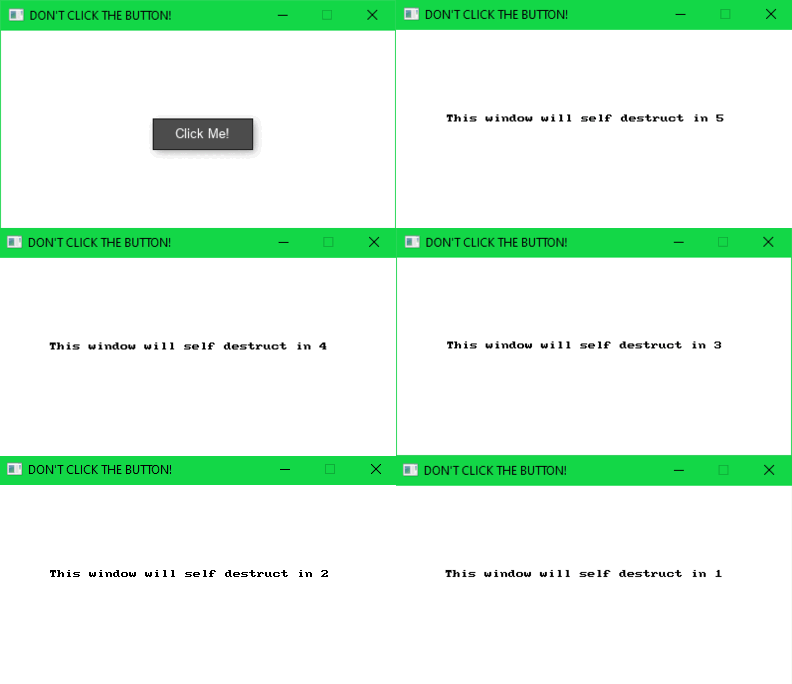
See Code Examples Example 1 : Starts a countdown to close the window at the push of a button.
window wind = open_window ( " DON'T CLICK THE BUTTON! " , 400 , 200 );
bool countdown_started = false ;
timer countdown_timer = create_timer ( " countdown " );
while ( ! quit_requested ())
clear_window (wind, COLOR_WHITE);
// Show the button before countdown starts
if ( button ( " Click Me! " , rectangle_from ( 150 , 85 , 100 , 30 )))
countdown_started = true ;
start_timer (countdown_timer);
draw_text ( " This window will self destruct in " + std:: to_string (countdown), COLOR_BLACK, " arial " , 18 , 50 , 85 );
// Check if 1 second has passed
if ( timer_ticks (countdown_timer) > 1000 )
reset_timer (countdown_timer);
// close all open windows
using static SplashKitSDK . SplashKit;
Window wind = OpenWindow ( " DON'T CLICK THE BUTTON! " , 400 , 200 );
bool countdownStarted = false ;
// SplashKitSDK.Timer needed to distinguish from System.Threading.Timer
SplashKitSDK . Timer countdownTimer = new SplashKitSDK . Timer( " countdown " );
ClearWindow (wind, ColorWhite ());
// Show the button before countdown starts
if ( Button ( " Click Me! " , RectangleFrom ( 150 , 85 , 100 , 30 )))
StartTimer (countdownTimer);
DrawText ( $" This window will self destruct in { countdown } " , ColorBlack (), " arial " , 18 , 50 , 85 );
// Check if 1 second has passed
if ( TimerTicks (countdownTimer) > 1000 )
ResetTimer (countdownTimer);
// draw interface and refresh
// close all open windows
namespace CloseWindowExample
public static void Main ()
Window wind = SplashKit . OpenWindow ( " DON'T CLICK THE BUTTON! " , 400 , 200 );
bool countdownStarted = false ;
SplashKitSDK . Timer countdownTimer = new SplashKitSDK . Timer( " countdown " );
while ( ! SplashKit . QuitRequested ())
SplashKit . ProcessEvents ();
SplashKit . ClearWindow (wind, Color . White );
// Show the button before countdown starts
if ( SplashKit . Button ( " Click Me! " , SplashKit . RectangleFrom ( 150 , 85 , 100 , 30 )))
SplashKit . StartTimer (countdownTimer);
SplashKit . DrawText ( $" This window will self destruct in { countdown } " , Color . Black , " arial " , 18 , 50 , 85 );
// Check if 1 second has passed
if ( SplashKit . TimerTicks (countdownTimer) > 1000 )
SplashKit . ResetTimer (countdownTimer);
SplashKit . CloseWindow (wind);
// draw interface and refresh
SplashKit . DrawInterface ();
SplashKit . RefreshWindow (wind);
// close all open windows
SplashKit . CloseAllWindows ();
wind = open_window ( " DON'T CLICK THE BUTTON! " , 400 , 200 )
countdown_started = False
countdown_timer = create_timer ( " countdown " )
while not quit_requested ():
clear_window ( wind , color_white ())
if not countdown_started:
# Show the button before countdown starts
if button_at_position ( " Click Me! " , rectangle_from ( 150 , 85 , 100 , 30 )):
start_timer ( countdown_timer )
draw_text_font_as_string ( f "This window will self destruct in {countdown} " , color_black () , " arial " , 18 , 50 , 85 )
# Check if 1 second has passed
if timer_ticks ( countdown_timer ) > 1000 :
reset_timer ( countdown_timer )
# draw interface and refresh
Output :
Returns the window that you are currently interacting with. This will be the default window for drawing options, and events.
Return Type: Window
Returns: The current window
Signatures:
public static Window SplashKit . CurrentWindow ();
function CurrentWindow (): Window
Usage: {</>}
See Implementations API Documentation Code Examples :
Indicate if the current window has a border.
Return Type: Boolean
Returns: True if the window has a border
Signatures:
bool current_window_has_border ()
public static bool SplashKit . CurrentWindowHasBorder ();
def current_window_has_border () :
function CurrentWindowHasBorder (): Boolean
Returns the height of the current window.
Return Type: Integer
Returns: The height of the current window
Signatures:
int current_window_height ()
public static int SplashKit . CurrentWindowHeight ();
def current_window_height () :
function CurrentWindowHeight (): Integer
Is the current window currently fullscreen?
Return Type: Boolean
Returns: True when the window is fullscreen
Signatures:
bool current_window_is_fullscreen ()
public static bool SplashKit . CurrentWindowIsFullscreen ();
def current_window_is_fullscreen () :
function CurrentWindowIsFullscreen (): Boolean
Usage: {</>}
See Implementations API Documentation Code Examples :
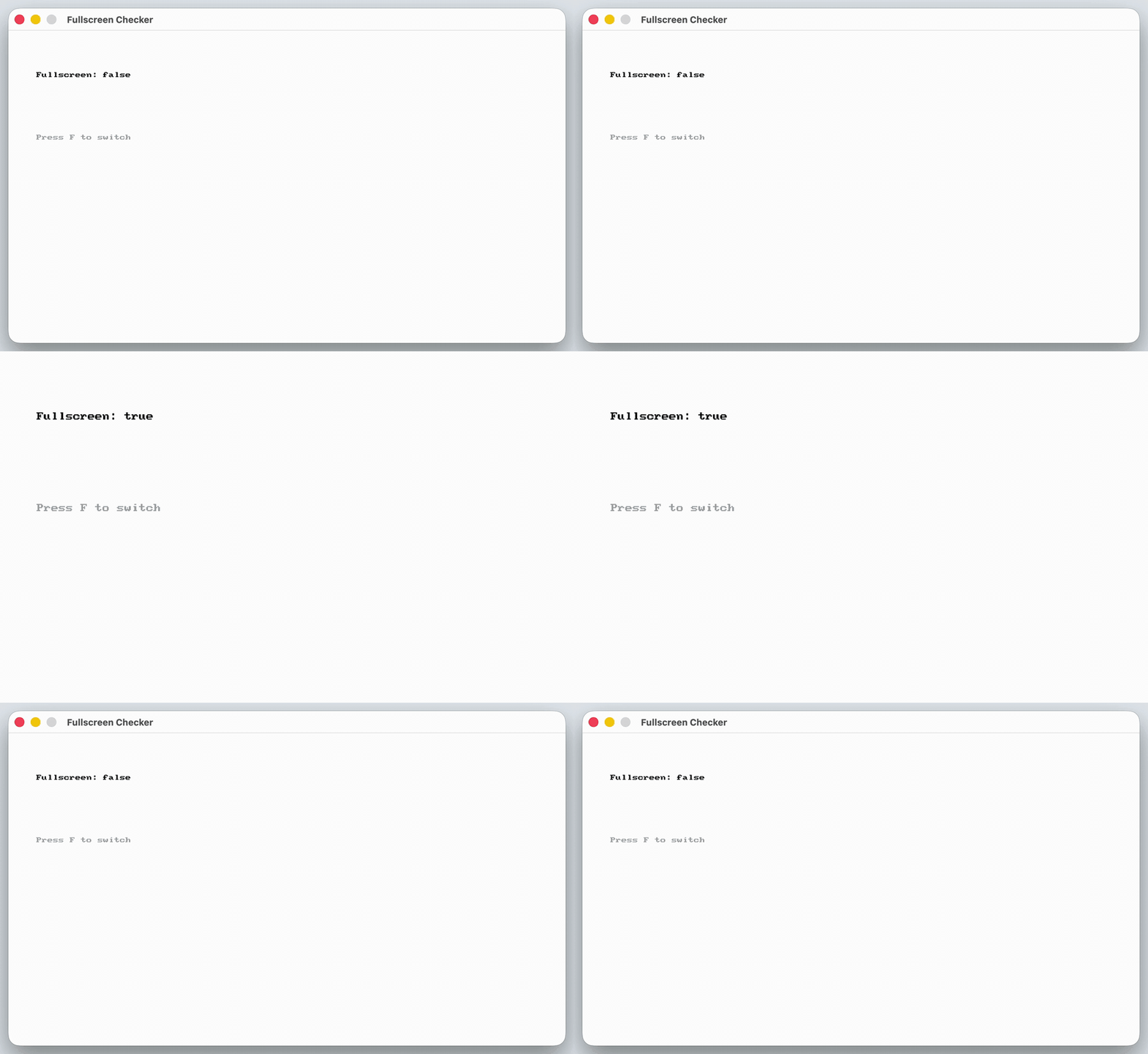
See Code Examples Example 1 : Fullscreen Checker
open_window ( " Fullscreen Checker " , 800 , 450 );
while ( ! quit_requested ())
// Give the player a way to change the state that we are about to check
current_window_toggle_fullscreen ();
clear_screen (COLOR_WHITE);
// Check every frame so the text always matches what the window is doing
bool is_fullscreen = current_window_is_fullscreen ();
draw_text ( " Fullscreen: true " , COLOR_BLACK, " arial " , 48 , 40 , 60 );
draw_text ( " Fullscreen: false " , COLOR_BLACK, " arial " , 48 , 40 , 60 );
draw_text ( " Press F to switch " , COLOR_DARK_GRAY, " arial " , 28 , 40 , 150 );
using static SplashKitSDK . SplashKit;
OpenWindow ( " Fullscreen Checker " , 800 , 450 );
// Give the player a way to change the state that we are about to check
if ( KeyTyped ( KeyCode . FKey ))
CurrentWindowToggleFullscreen ();
ClearScreen ( ColorWhite ());
// Check every frame so the text always matches what the window is doing
bool isFullscreen = CurrentWindowIsFullscreen ();
DrawText ( " Fullscreen: true " , ColorBlack (), " arial " , 48 , 40 , 60 );
DrawText ( " Fullscreen: false " , ColorBlack (), " arial " , 48 , 40 , 60 );
DrawText ( " Press F to switch " , ColorDarkGray (), " arial " , 28 , 40 , 150 );
namespace CurrentWindowIsFullscreenExample
public static void Main ()
SplashKit . OpenWindow ( " Fullscreen Checker " , 800 , 450 );
while ( ! SplashKit . QuitRequested ())
SplashKit . ProcessEvents ();
// Give the player a way to change the state that we are about to check
if ( SplashKit . KeyTyped ( KeyCode . FKey ))
SplashKit . CurrentWindowToggleFullscreen ();
SplashKit . ClearScreen ( Color . White );
// Check every frame so the text always matches what the window is doing
bool isFullscreen = SplashKit . CurrentWindowIsFullscreen ();
SplashKit . DrawText ( " Fullscreen: true " , Color . Black , " arial " , 48 , 40 , 60 );
SplashKit . DrawText ( " Fullscreen: false " , Color . Black , " arial " , 48 , 40 , 60 );
SplashKit . DrawText ( " Press F to switch " , Color . DarkGray , " arial " , 28 , 40 , 150 );
SplashKit . RefreshScreen ( 60 );
SplashKit . CloseAllWindows ();
open_window ( " Fullscreen Checker " , 800 , 450 )
while not quit_requested ():
# Give the player a way to change the state that we are about to check
if key_typed ( KeyCode.f_key ):
current_window_toggle_fullscreen ()
# Check every frame so the text always matches what the window is doing
is_fullscreen = current_window_is_fullscreen ()
draw_text_font_as_string ( " Fullscreen: true " , color_black () , " arial " , 48 , 40 , 60 )
draw_text_font_as_string ( " Fullscreen: false " , color_black () , " arial " , 48 , 40 , 60 )
draw_text_font_as_string ( " Press F to switch " , color_dark_gray () , " arial " , 28 , 40 , 150 )
refresh_screen_with_target_fps ( 60 )
Output :
The location of the current window.
Return Type: Point 2d
Returns: Its location on the displays
Signatures:
point_2d current_window_position ()
public static Point2D SplashKit . CurrentWindowPosition ();
def current_window_position () :
function CurrentWindowPosition (): Point2D
Toggle the current window border.
Signatures:
void current_window_toggle_border ()
public static void SplashKit . CurrentWindowToggleBorder ();
def current_window_toggle_border () :
procedure CurrentWindowToggleBorder ()
Toggle the fullscreen property of the current window
Signatures:
void current_window_toggle_fullscreen ()
public static void SplashKit . CurrentWindowToggleFullscreen ();
def current_window_toggle_fullscreen () :
procedure CurrentWindowToggleFullscreen ()
Usage: {</>}
See Implementations API Documentation Code Examples :
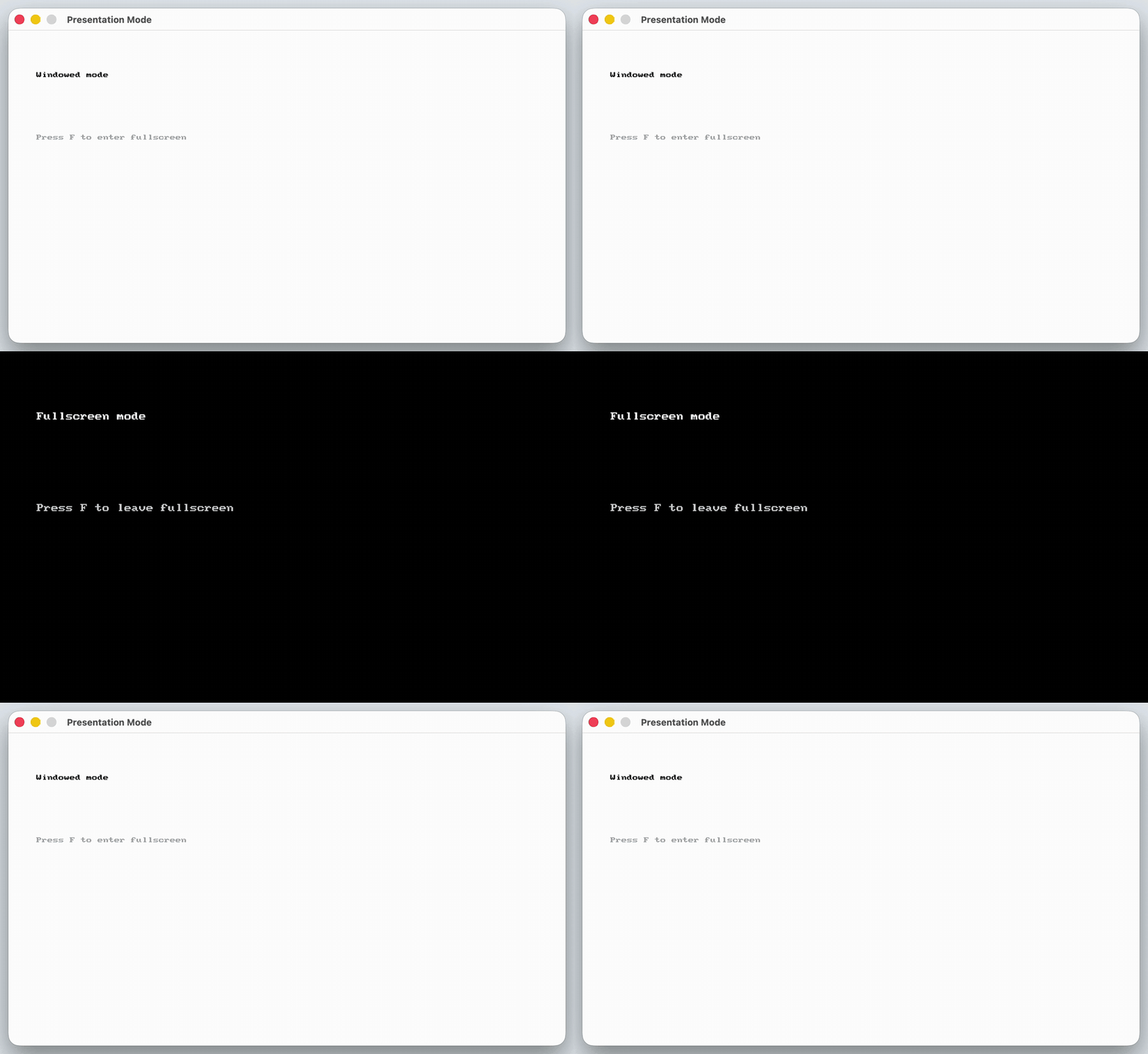
See Code Examples Example 1 : Presentation Mode
open_window ( " Presentation Mode " , 800 , 450 );
while ( ! quit_requested ())
// Toggling means the same key can both enter and leave fullscreen
current_window_toggle_fullscreen ();
// Draw for the new state so the screen shows which mode the window is in
if ( current_window_is_fullscreen ())
clear_screen (COLOR_BLACK);
draw_text ( " Fullscreen mode " , COLOR_WHITE, " arial " , 48 , 40 , 60 );
draw_text ( " Press F to leave fullscreen " , COLOR_LIGHT_GRAY, " arial " , 28 , 40 , 150 );
clear_screen (COLOR_WHITE);
draw_text ( " Windowed mode " , COLOR_BLACK, " arial " , 48 , 40 , 60 );
draw_text ( " Press F to enter fullscreen " , COLOR_DARK_GRAY, " arial " , 28 , 40 , 150 );
using static SplashKitSDK . SplashKit;
OpenWindow ( " Presentation Mode " , 800 , 450 );
// Toggling means the same key can both enter and leave fullscreen
if ( KeyTyped ( KeyCode . FKey ))
CurrentWindowToggleFullscreen ();
// Draw for the new state so the screen shows which mode the window is in
if ( CurrentWindowIsFullscreen ())
ClearScreen ( ColorBlack ());
DrawText ( " Fullscreen mode " , ColorWhite (), " arial " , 48 , 40 , 60 );
DrawText ( " Press F to leave fullscreen " , ColorLightGray (), " arial " , 28 , 40 , 150 );
ClearScreen ( ColorWhite ());
DrawText ( " Windowed mode " , ColorBlack (), " arial " , 48 , 40 , 60 );
DrawText ( " Press F to enter fullscreen " , ColorDarkGray (), " arial " , 28 , 40 , 150 );
namespace CurrentWindowToggleFullscreenExample
public static void Main ()
SplashKit . OpenWindow ( " Presentation Mode " , 800 , 450 );
while ( ! SplashKit . QuitRequested ())
SplashKit . ProcessEvents ();
// Toggling means the same key can both enter and leave fullscreen
if ( SplashKit . KeyTyped ( KeyCode . FKey ))
SplashKit . CurrentWindowToggleFullscreen ();
// Draw for the new state so the screen shows which mode the window is in
if ( SplashKit . CurrentWindowIsFullscreen ())
SplashKit . ClearScreen ( Color . Black );
SplashKit . DrawText ( " Fullscreen mode " , Color . White , " arial " , 48 , 40 , 60 );
SplashKit . DrawText ( " Press F to leave fullscreen " , Color . LightGray , " arial " , 28 , 40 , 150 );
SplashKit . ClearScreen ( Color . White );
SplashKit . DrawText ( " Windowed mode " , Color . Black , " arial " , 48 , 40 , 60 );
SplashKit . DrawText ( " Press F to enter fullscreen " , Color . DarkGray , " arial " , 28 , 40 , 150 );
SplashKit . RefreshScreen ( 60 );
SplashKit . CloseAllWindows ();
open_window ( " Presentation Mode " , 800 , 450 )
while not quit_requested ():
# Toggling means the same key can both enter and leave fullscreen
if key_typed ( KeyCode.f_key ):
current_window_toggle_fullscreen ()
# Draw for the new state so the screen shows which mode the window is in
if current_window_is_fullscreen ():
clear_screen ( color_black ())
draw_text_font_as_string ( " Fullscreen mode " , color_white () , " arial " , 48 , 40 , 60 )
draw_text_font_as_string ( " Press F to leave fullscreen " , color_light_gray () , " arial " , 28 , 40 , 150 )
clear_screen ( color_white ())
draw_text_font_as_string ( " Windowed mode " , color_black () , " arial " , 48 , 40 , 60 )
draw_text_font_as_string ( " Press F to enter fullscreen " , color_dark_gray () , " arial " , 28 , 40 , 150 )
refresh_screen_with_target_fps ( 60 )
Output :
Returns the width of the current window.
Return Type: Integer
Returns: The width of the current window
Signatures:
int current_window_width ()
public static int SplashKit . CurrentWindowWidth ();
def current_window_width () :
function CurrentWindowWidth (): Integer
Usage: {</>}
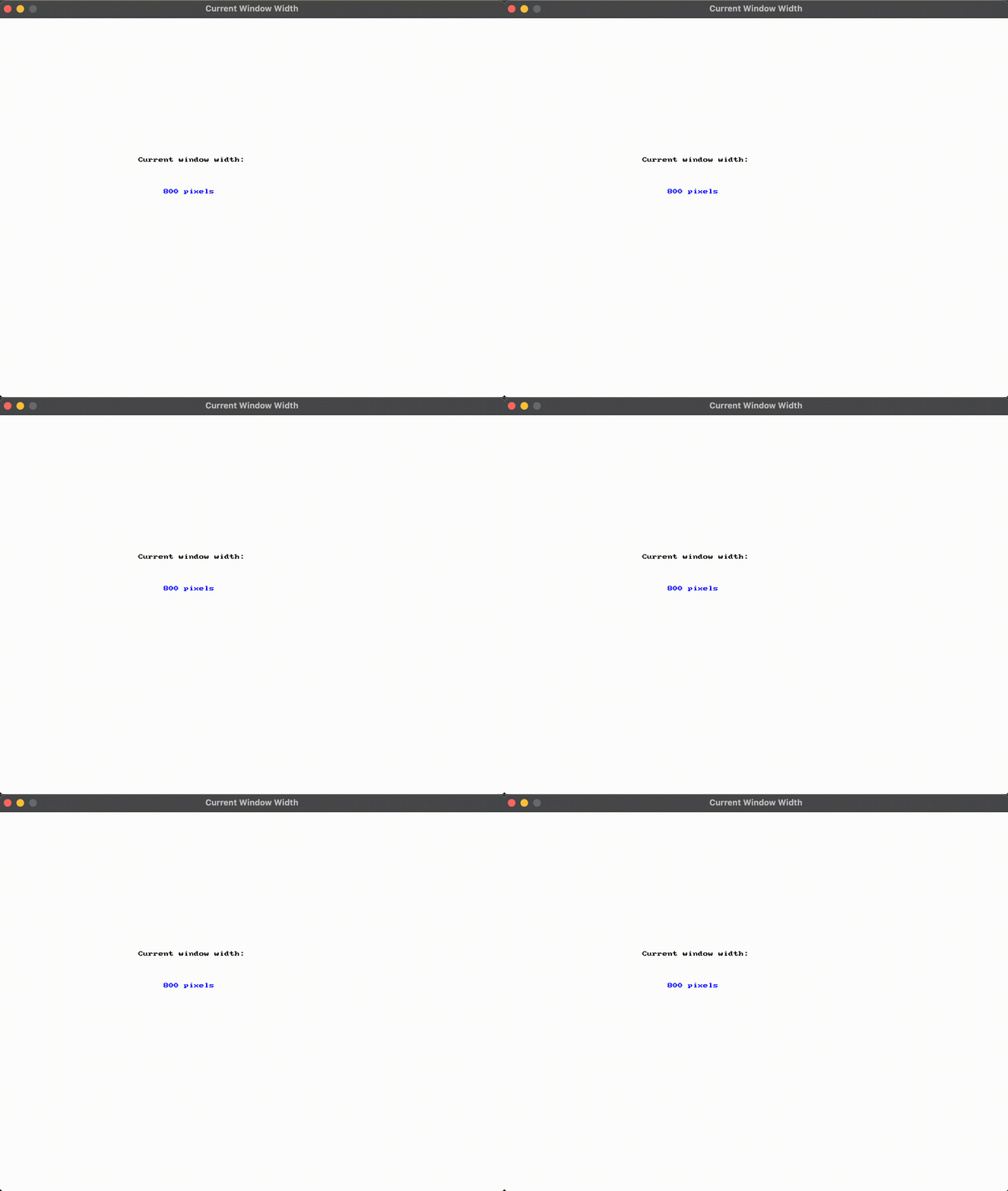
See Code Examples Example 1 : Show the Current Window Width
open_window ( " Current Window Width " , 800 , 600 );
while ( ! quit_requested ())
int window_width = current_window_width ();
clear_screen (COLOR_WHITE);
draw_text ( " Current window width: " , COLOR_BLACK, 220 , 220 );
draw_text (std:: to_string (window_width) + " pixels " , COLOR_BLUE, 260 , 270 );
using static SplashKitSDK . SplashKit;
OpenWindow ( " Current Window Width " , 800 , 600 );
int windowWidth = CurrentWindowWidth ();
ClearScreen ( ColorWhite ());
DrawText ( " Current window width: " , ColorBlack (), 220 , 220 );
DrawText ( windowWidth . ToString () + " pixels " , ColorBlue (), 260 , 270 );
namespace CurrentWindowWidthExample
public static void Main ()
SplashKit . OpenWindow ( " Current Window Width " , 800 , 600 );
while ( ! SplashKit . QuitRequested ())
SplashKit . ProcessEvents ();
int windowWidth = SplashKit . CurrentWindowWidth ();
SplashKit . ClearScreen ( Color . White );
SplashKit . DrawText ( " Current window width: " , Color . Black , 220 , 220 );
SplashKit . DrawText ( windowWidth . ToString () + " pixels " , Color . Blue , 260 , 270 );
SplashKit . RefreshScreen ( 60 );
SplashKit . CloseAllWindows ();
open_window ( " Current Window Width " , 800 , 600 )
while not quit_requested ():
window_width = current_window_width ()
clear_screen ( color_white ())
draw_text_no_font_no_size ( " Current window width: " , color_black () , 220 , 220 )
draw_text_no_font_no_size ( str ( window_width ) + " pixels " , color_blue () , 260 , 270 )
refresh_screen_with_target_fps ( 60 )
Output :
The x location of the current window on the displays.
Return Type: Integer
Returns: Its location on the displays
Signatures:
public static int SplashKit . CurrentWindowX ();
function CurrentWindowX (): Integer
The y location of the current window on the displays.
Return Type: Integer
Returns: Its location on the displays
Signatures:
public static int SplashKit . CurrentWindowY ();
function CurrentWindowY (): Integer
Determines if SplashKit has a window loaded with the supplied name. This checks against all windows loaded, those loaded without a name are assigned the filename as a default. If this returns false, you may want to use load_window to load in a specific window and give it the desired name.
Parameters:
Name Type Description caption StringThe name of the window to check for.
Return Type: Boolean
Returns: Returns true if there is a window with the given caption
which has has been loaded.
Signatures:
bool has_window (string caption )
public static bool SplashKit . HasWindow ( string caption);
function HasWindow (caption: String ): Boolean
Check if the requested window is the current window.
Parameters:
Name Type Description wind WindowThe window to check
Return Type: Boolean
Returns: true if the window is the current window
Signatures:
bool is_current_window (window wind )
public bool Window . IsCurrentWindow { get }
public static bool SplashKit . IsCurrentWindow (Window wind);
def is_current_window ( wind ) :
function IsCurrentWindow (wind: Window): Boolean
Move the current window to the new location on the displays.
Parameters:
Name Type Description x IntegerThe new x location y IntegerThe new y location
Signatures:
void move_current_window_to ( int x , int y )
public static void SplashKit . MoveCurrentWindowTo ( int x, int y);
def move_current_window_to ( x , y ) :
procedure MoveCurrentWindowTo (x: Integer ; y: Integer )
Move the window to the new location on the displays.
Parameters:
Name Type Description name StringThe name of the window to move x IntegerThe new x location y IntegerThe new y location
Signatures:
void move_window_to ( const string & name , int x , int y )
public static void SplashKit . MoveWindowTo ( string name, int x, int y);
def move_window_to_named ( name , x , y ) :
procedure MoveWindowTo ( const name : String ; x: Integer ; y: Integer )
Move the window to the new location on the displays.
Parameters:
Name Type Description wind Windowthe window to move. x IntegerThe new x location y IntegerThe new y location
Signatures:
void move_window_to (window wind , int x , int y )
public void Window . MoveTo ( int x, int y);
public static void SplashKit . MoveWindowTo (Window wind, int x, int y);
def move_window_to ( wind , x , y ) :
procedure MoveWindowTo (wind: Window; x: Integer ; y: Integer )
Usage: {</>}
See Implementations API Documentation Code Examples :
Opens a new graphics window. The supplied caption is used to name and identify the window. The supplied width and height indicate the size of the window. The window can be retrieved by passing caption to the Window Named
Parameters:
Name Type Description caption StringThe title of the window. If a window with this caption already exists, SplashKit will alter the caption to ensure that it is unique. width IntegerThe width of the window height IntegerThe height of the window
Return Type: Window
Returns: A new window
Signatures:
window open_window (string caption , int width , int height )
public static Window SplashKit . OpenWindow ( string caption, int width, int height);
public Window ( string caption, int width, int height);
def open_window ( caption , width , height ) :
function OpenWindow (caption: String ; width: Integer ; height: Integer ): Window
Usage: {</>}
See Implementations Tutorials and Guides :
API Documentation Code Examples :
Refreshes the window wind.
Parameters:
Signatures:
void refresh_window (window wind )
public void Window . Refresh ();
public static void SplashKit . RefreshWindow (Window wind);
def refresh_window ( wind ) :
procedure RefreshWindow (wind: Window)
Usage: {</>}
See Implementations API Documentation Code Examples :
Refreshes the window wind.
Parameters:
Name Type Description wind Windowthe Window target_fps Unsigned Integerthe desired framerate
Signatures:
void refresh_window (window wind , unsigned int target_fps )
public void Window . Refresh ( uint targetFps);
public static void SplashKit . RefreshWindow (Window wind, uint targetFps);
def refresh_window_with_target_fps ( wind , target_fps ) :
procedure RefreshWindow (wind: Window; targetFps: Cardinal )
Change the size of the current window.
Parameters:
Name Type Description width IntegerIts new width height IntegerIts new height
Signatures:
void resize_current_window ( int width , int height )
public static void SplashKit . ResizeCurrentWindow ( int width, int height);
def resize_current_window ( width , height ) :
procedure ResizeCurrentWindow (width: Integer ; height: Integer )
Change the size of the window.
Parameters:
Name Type Description wnd WindowThe window to change. width IntegerIts new width height IntegerIts new height
Signatures:
void resize_window (window wnd , int width , int height )
public void Window . Resize ( int width, int height);
public static void SplashKit . ResizeWindow (Window wnd, int width, int height);
def resize_window ( wnd , width , height ) :
procedure ResizeWindow (wnd: Window; width: Integer ; height: Integer )
Set the current window to the window with the supplied caption.
Parameters:
Name Type Description name StringThe caption of the new current window.
Signatures:
void set_current_window ( const string & name )
public static void SplashKit . SetCurrentWindow ( string name);
def set_current_window_named ( name ) :
procedure SetCurrentWindow ( const name : String )
Change the current window. Use this so that you can draw to different windows by default.
Parameters:
Name Type Description wind WindowThe new current window
Signatures:
void set_current_window (window wind )
public void Window . MakeCurrent ();
public static void SplashKit . SetCurrentWindow (Window wind);
def set_current_window ( wind ) :
procedure SetCurrentWindow (wind: Window)
The caption of the window.
Parameters:
Name Type Description wind WindowThe window
Return Type: String
Returns: The window’s caption.
Signatures:
string window_caption (window wind )
public string Window . Caption { get }
public static string SplashKit . WindowCaption (Window wind);
def window_caption ( wind ) :
function WindowCaption (wind: Window): String
Checks all opened windows in the current program to determin if a window with the name name is currently open, and will close a window if one is found.
Parameters:
Name Type Description name StringThe name of the window to close
Return Type: Boolean
Returns: Returns true if the window has been asked to close.
Signatures:
bool window_close_requested ( const string & name )
public static bool SplashKit . WindowCloseRequested ( string name);
def window_close_requested_named ( name ) :
function WindowCloseRequested ( const name : String ): Boolean
Closes the window given in wind
Parameters:
Return Type: Boolean
Returns: Returns true if the window is closed,
false if there is an error.
Signatures:
bool window_close_requested (window wind )
public bool Window . CloseRequested { get }
public static bool SplashKit . WindowCloseRequested (Window wind);
def window_close_requested ( wind ) :
function WindowCloseRequested (wind: Window): Boolean
Usage: {</>}
See Implementations Tutorials and Guides :
API Documentation Code Examples :
Indicate if the window has a border.
Parameters:
Name Type Description name StringThe name of the window
Return Type: Boolean
Returns: True if the window has a border
Signatures:
bool window_has_border ( const string & name )
public static bool SplashKit . WindowHasBorder ( string name);
def window_has_border_named ( name ) :
function WindowHasBorder ( const name : String ): Boolean
Indicate if the window has a border.
Parameters:
Name Type Description wnd WindowThe window
Return Type: Boolean
Returns: True if the window has a border
Signatures:
bool window_has_border (window wnd )
public bool Window . HasBorder { get }
public static bool SplashKit . WindowHasBorder (Window wnd);
def window_has_border ( wnd ) :
function WindowHasBorder (wnd: Window): Boolean
Indicates if the window has focus.
Parameters:
Name Type Description wind WindowThe window
Return Type: Boolean
Returns: True if the window has the user’s focus
Signatures:
bool window_has_focus (window wind )
public bool Window . HasFocus { get }
public static bool SplashKit . WindowHasFocus (Window wind);
def window_has_focus ( wind ) :
function WindowHasFocus (wind: Window): Boolean
Usage: {</>}
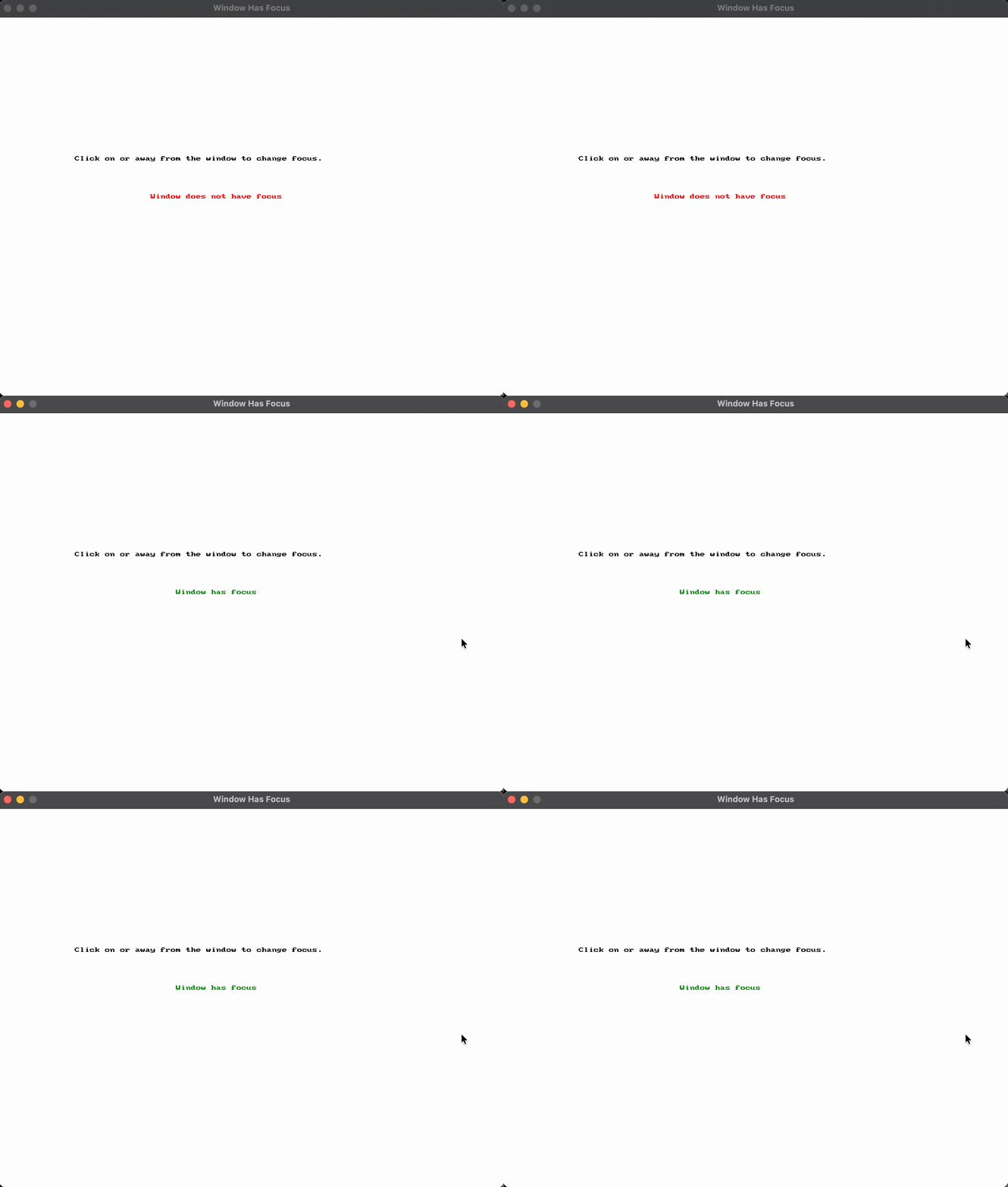
See Code Examples Example 1 : Show Whether the Window Has Focus
open_window ( " Window Has Focus " , 800 , 600 );
while ( ! quit_requested ())
// Check whether the current window has focus
bool has_focus = window_has_focus ( current_window ());
clear_screen (COLOR_WHITE);
// Show the current focus state on screen
draw_text ( " Click on or away from the window to change focus. " , COLOR_BLACK, 120 , 220 );
draw_text ( " Window has focus " , COLOR_GREEN, 280 , 280 );
draw_text ( " Window does not have focus " , COLOR_RED, 240 , 280 );
using static SplashKitSDK . SplashKit;
OpenWindow ( " Window Has Focus " , 800 , 600 );
// Check whether the current window has focus
bool hasFocus = WindowHasFocus ( CurrentWindow ());
ClearScreen ( ColorWhite ());
// Show the current focus state on screen
DrawText ( " Click on or away from the window to change focus. " , ColorBlack (), 120 , 220 );
DrawText ( " Window has focus " , ColorGreen (), 280 , 280 );
DrawText ( " Window does not have focus " , ColorRed (), 240 , 280 );
namespace WindowHasFocusExample
public static void Main ()
SplashKit . OpenWindow ( " Window Has Focus " , 800 , 600 );
while ( ! SplashKit . QuitRequested ())
SplashKit . ProcessEvents ();
// Check whether the current window has focus
bool hasFocus = SplashKit . WindowHasFocus ( SplashKit . CurrentWindow ());
SplashKit . ClearScreen ( Color . White );
// Show the current focus state on screen
SplashKit . DrawText ( " Click on or away from the window to change focus. " , Color . Black , 120 , 220 );
SplashKit . DrawText ( " Window has focus " , Color . Green , 280 , 280 );
SplashKit . DrawText ( " Window does not have focus " , Color . Red , 240 , 280 );
SplashKit . RefreshScreen ( 60 );
SplashKit . CloseAllWindows ();
open_window ( " Window Has Focus " , 800 , 600 )
while not quit_requested ():
# Check whether the current window has focus
has_focus = window_has_focus ( current_window ())
clear_screen ( color_white ())
# Show the current focus state on screen
draw_text_no_font_no_size ( " Click on or away from the window to change focus. " , color_black () , 120 , 220 )
draw_text_no_font_no_size ( " Window has focus " , color_green () , 280 , 280 )
draw_text_no_font_no_size ( " Window does not have focus " , color_red () , 240 , 280 )
refresh_screen_with_target_fps ( 60 )
Output :
Returns the height of the window with the indicated name in pixels.
Parameters:
Name Type Description name StringThe name of the window
Return Type: Integer
Returns: The height of the window
Signatures:
int window_height ( const string & name )
public static int SplashKit . WindowHeight ( string name);
def window_height_named ( name ) :
function WindowHeight ( const name : String ): Integer
Returns the height of the window in pixels.
Parameters:
Name Type Description wind WindowThe window
Return Type: Integer
Returns: The height of the window
Signatures:
int window_height (window wind )
public int Window . Height { get }
public static int SplashKit . WindowHeight (Window wind);
function WindowHeight (wind: Window): Integer
Is the window currently fullscreen?
Parameters:
Name Type Description name StringThe name of the window to check
Return Type: Boolean
Returns: True when the window is fullscreen
Signatures:
bool window_is_fullscreen ( const string & name )
public static bool SplashKit . WindowIsFullscreen ( string name);
def window_is_fullscreen_named ( name ) :
function WindowIsFullscreen ( const name : String ): Boolean
Usage: {</>}
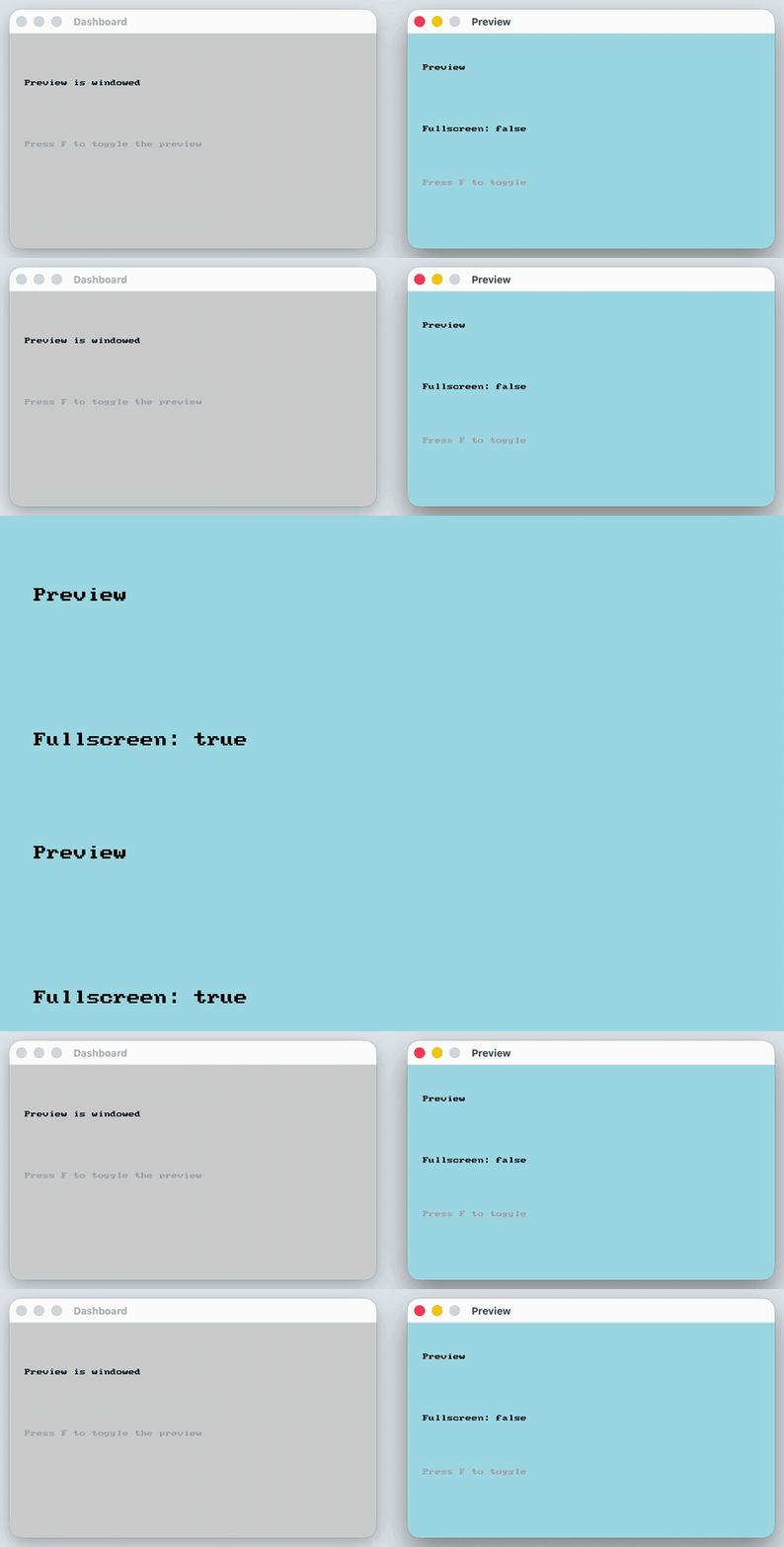
See Code Examples Example 1 : Caption Status Light
// Keep the caption in one variable so the window and the lookups can never disagree
string preview_caption = " Preview " ;
window dashboard_window = open_window ( " Dashboard " , 480 , 280 );
window preview_window = open_window (preview_caption, 480 , 280 );
// Place the windows side by side so both stay visible
move_window_to (dashboard_window, 60 , 100 );
move_window_to (preview_window, 580 , 100 );
while ( ! quit_requested ())
// The F key sends the preview window in and out of fullscreen
window_toggle_fullscreen (preview_caption);
// Look the window up by its caption, so no window handle is needed here
bool preview_is_fullscreen = window_is_fullscreen (preview_caption);
// The whole dashboard acts as a status light
if (preview_is_fullscreen)
clear_window (dashboard_window, COLOR_LIGHT_GREEN);
draw_text_on_window (dashboard_window, " Preview is fullscreen " , COLOR_BLACK, " arial " , 30 , 20 , 60 );
clear_window (dashboard_window, COLOR_LIGHT_GRAY);
draw_text_on_window (dashboard_window, " Preview is windowed " , COLOR_BLACK, " arial " , 30 , 20 , 60 );
draw_text_on_window (dashboard_window, " Press F to toggle the preview " , COLOR_DARK_GRAY, " arial " , 20 , 20 , 140 );
refresh_window (dashboard_window);
clear_window (preview_window, COLOR_LIGHT_BLUE);
draw_text_on_window (preview_window, " Preview " , COLOR_BLACK, " arial " , 40 , 20 , 40 );
// The preview shows the same answer, because the dashboard is hidden while it fills the screen
if (preview_is_fullscreen)
draw_text_on_window (preview_window, " Fullscreen: true " , COLOR_BLACK, " arial " , 30 , 20 , 120 );
draw_text_on_window (preview_window, " Fullscreen: false " , COLOR_BLACK, " arial " , 30 , 20 , 120 );
draw_text_on_window (preview_window, " Press F to toggle " , COLOR_DARK_GRAY, " arial " , 20 , 20 , 190 );
refresh_window (preview_window);
using static SplashKitSDK . SplashKit;
// Keep the caption in one variable so the window and the lookups can never disagree
string previewCaption = " Preview " ;
Window dashboardWindow = OpenWindow ( " Dashboard " , 480 , 280 );
Window previewWindow = OpenWindow (previewCaption, 480 , 280 );
// Place the windows side by side so both stay visible
MoveWindowTo (dashboardWindow, 60 , 100 );
MoveWindowTo (previewWindow, 580 , 100 );
// The F key sends the preview window in and out of fullscreen
if ( KeyTyped ( KeyCode . FKey ))
WindowToggleFullscreen (previewCaption);
// Look the window up by its caption, so no window handle is needed here
bool previewIsFullscreen = WindowIsFullscreen (previewCaption);
// The whole dashboard acts as a status light
ClearWindow (dashboardWindow, ColorLightGreen ());
DrawTextOnWindow (dashboardWindow, " Preview is fullscreen " , ColorBlack (), " arial " , 30 , 20 , 60 );
ClearWindow (dashboardWindow, ColorLightGray ());
DrawTextOnWindow (dashboardWindow, " Preview is windowed " , ColorBlack (), " arial " , 30 , 20 , 60 );
DrawTextOnWindow (dashboardWindow, " Press F to toggle the preview " , ColorDarkGray (), " arial " , 20 , 20 , 140 );
RefreshWindow (dashboardWindow);
ClearWindow (previewWindow, ColorLightBlue ());
DrawTextOnWindow (previewWindow, " Preview " , ColorBlack (), " arial " , 40 , 20 , 40 );
// The preview shows the same answer, because the dashboard is hidden while it fills the screen
DrawTextOnWindow (previewWindow, " Fullscreen: true " , ColorBlack (), " arial " , 30 , 20 , 120 );
DrawTextOnWindow (previewWindow, " Fullscreen: false " , ColorBlack (), " arial " , 30 , 20 , 120 );
DrawTextOnWindow (previewWindow, " Press F to toggle " , ColorDarkGray (), " arial " , 20 , 20 , 190 );
RefreshWindow (previewWindow);
namespace WindowIsFullscreenNamedExample
public static void Main ()
// Keep the caption in one variable so the window and the lookups can never disagree
string previewCaption = " Preview " ;
Window dashboardWindow = SplashKit . OpenWindow ( " Dashboard " , 480 , 280 );
Window previewWindow = SplashKit . OpenWindow (previewCaption, 480 , 280 );
// Place the windows side by side so both stay visible
dashboardWindow . MoveTo ( 60 , 100 );
previewWindow . MoveTo ( 580 , 100 );
while ( ! SplashKit . QuitRequested ())
SplashKit . ProcessEvents ();
// The F key sends the preview window in and out of fullscreen
if ( SplashKit . KeyTyped ( KeyCode . FKey ))
SplashKit . WindowToggleFullscreen (previewCaption);
// Look the window up by its caption, so no window handle is needed here
bool previewIsFullscreen = SplashKit . WindowIsFullscreen (previewCaption);
// The whole dashboard acts as a status light
dashboardWindow . Clear ( Color . LightGreen );
dashboardWindow . DrawText ( " Preview is fullscreen " , Color . Black , " arial " , 30 , 20 , 60 );
dashboardWindow . Clear ( Color . LightGray );
dashboardWindow . DrawText ( " Preview is windowed " , Color . Black , " arial " , 30 , 20 , 60 );
dashboardWindow . DrawText ( " Press F to toggle the preview " , Color . DarkGray , " arial " , 20 , 20 , 140 );
dashboardWindow . Refresh ();
previewWindow . Clear ( Color . LightBlue );
previewWindow . DrawText ( " Preview " , Color . Black , " arial " , 40 , 20 , 40 );
// The preview shows the same answer, because the dashboard is hidden while it fills the screen
previewWindow . DrawText ( " Fullscreen: true " , Color . Black , " arial " , 30 , 20 , 120 );
previewWindow . DrawText ( " Fullscreen: false " , Color . Black , " arial " , 30 , 20 , 120 );
previewWindow . DrawText ( " Press F to toggle " , Color . DarkGray , " arial " , 20 , 20 , 190 );
SplashKit . CloseAllWindows ();
# Keep the caption in one variable so the window and the lookups can never disagree
preview_caption = " Preview "
dashboard_window = open_window ( " Dashboard " , 480 , 280 )
preview_window = open_window ( preview_caption , 480 , 280 )
# Place the windows side by side so both stay visible
move_window_to ( dashboard_window , 60 , 100 )
move_window_to ( preview_window , 580 , 100 )
while not quit_requested ():
# The F key sends the preview window in and out of fullscreen
if key_typed ( KeyCode.f_key ):
window_toggle_fullscreen_named ( preview_caption )
# Look the window up by its caption, so no window handle is needed here
preview_is_fullscreen = window_is_fullscreen_named ( preview_caption )
# The whole dashboard acts as a status light
if preview_is_fullscreen:
clear_window ( dashboard_window , color_light_green ())
draw_text_on_window_font_as_string ( dashboard_window , " Preview is fullscreen " , color_black () , " arial " , 30 , 20 , 60 )
clear_window ( dashboard_window , color_light_gray ())
draw_text_on_window_font_as_string ( dashboard_window , " Preview is windowed " , color_black () , " arial " , 30 , 20 , 60 )
draw_text_on_window_font_as_string ( dashboard_window , " Press F to toggle the preview " , color_dark_gray () , " arial " , 20 , 20 , 140 )
refresh_window ( dashboard_window )
clear_window ( preview_window , color_light_blue ())
draw_text_on_window_font_as_string ( preview_window , " Preview " , color_black () , " arial " , 40 , 20 , 40 )
# The preview shows the same answer, because the dashboard is hidden while it fills the screen
if preview_is_fullscreen:
draw_text_on_window_font_as_string ( preview_window , " Fullscreen: true " , color_black () , " arial " , 30 , 20 , 120 )
draw_text_on_window_font_as_string ( preview_window , " Fullscreen: false " , color_black () , " arial " , 30 , 20 , 120 )
draw_text_on_window_font_as_string ( preview_window , " Press F to toggle " , color_dark_gray () , " arial " , 20 , 20 , 190 )
refresh_window ( preview_window )
Output :
Is the window currently fullscreen?
Parameters:
Name Type Description wnd WindowThe window to check
Return Type: Boolean
Returns: True when the window is fullscreen
Signatures:
bool window_is_fullscreen (window wnd )
public bool Window . IsFullscreen { get }
public static bool SplashKit . WindowIsFullscreen (Window wnd);
def window_is_fullscreen ( wnd ) :
function WindowIsFullscreen (wnd: Window): Boolean
Usage: {</>}
See Implementations API Documentation Code Examples :
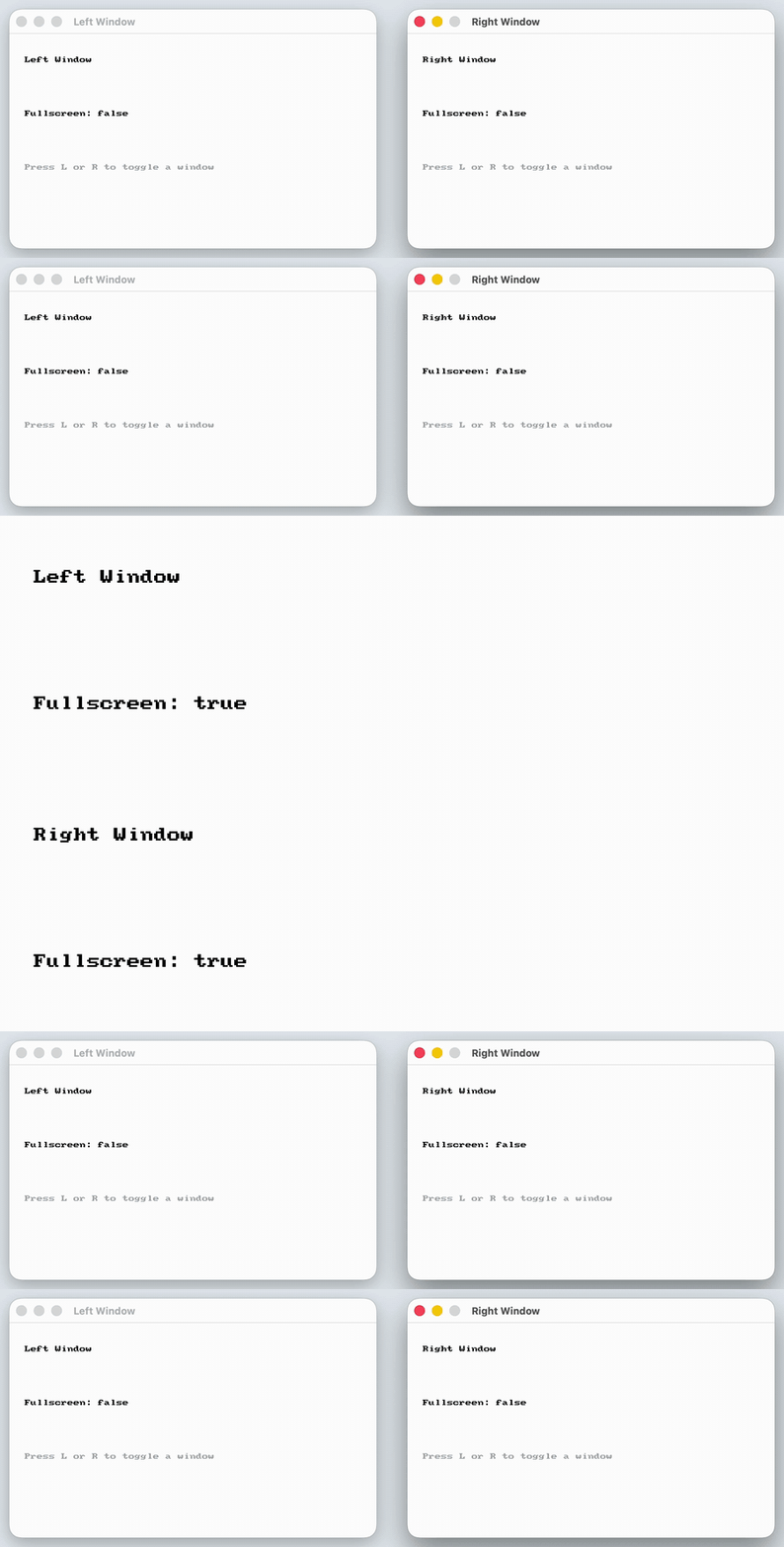
See Code Examples Example 1 : Window Status Board
void draw_window_status (window wnd , const string & name )
// Ask this specific window, using its handle, whether it is fullscreen
bool is_fullscreen = window_is_fullscreen (wnd);
clear_window (wnd, COLOR_WHITE);
draw_text_on_window (wnd, name, COLOR_BLACK, " arial " , 40 , 20 , 30 );
draw_text_on_window (wnd, " Fullscreen: true " , COLOR_BLACK, " arial " , 30 , 20 , 100 );
draw_text_on_window (wnd, " Fullscreen: false " , COLOR_BLACK, " arial " , 30 , 20 , 100 );
draw_text_on_window (wnd, " Press L or R to toggle a window " , COLOR_DARK_GRAY, " arial " , 20 , 20 , 170 );
window left_window = open_window ( " Left Window " , 480 , 280 );
window right_window = open_window ( " Right Window " , 480 , 280 );
// Place the windows side by side so both stay visible
move_window_to (left_window, 60 , 100 );
move_window_to (right_window, 580 , 100 );
while ( ! quit_requested ())
// Each key sends one window in or out of fullscreen
window_toggle_fullscreen (left_window);
window_toggle_fullscreen (right_window);
// Every window reports its own state, so the text stays visible while it fills the screen
draw_window_status (left_window, " Left Window " );
draw_window_status (right_window, " Right Window " );
using static SplashKitSDK . SplashKit;
void DrawWindowStatus (Window wnd, string name)
// Ask this specific window, using its handle, whether it is fullscreen
bool isFullscreen = WindowIsFullscreen (wnd);
ClearWindow (wnd, ColorWhite ());
DrawTextOnWindow (wnd, name, ColorBlack (), " arial " , 40 , 20 , 30 );
DrawTextOnWindow (wnd, " Fullscreen: true " , ColorBlack (), " arial " , 30 , 20 , 100 );
DrawTextOnWindow (wnd, " Fullscreen: false " , ColorBlack (), " arial " , 30 , 20 , 100 );
DrawTextOnWindow (wnd, " Press L or R to toggle a window " , ColorDarkGray (), " arial " , 20 , 20 , 170 );
Window leftWindow = OpenWindow ( " Left Window " , 480 , 280 );
Window rightWindow = OpenWindow ( " Right Window " , 480 , 280 );
// Place the windows side by side so both stay visible
MoveWindowTo (leftWindow, 60 , 100 );
MoveWindowTo (rightWindow, 580 , 100 );
// Each key sends one window in or out of fullscreen
if ( KeyTyped ( KeyCode . LKey ))
WindowToggleFullscreen (leftWindow);
if ( KeyTyped ( KeyCode . RKey ))
WindowToggleFullscreen (rightWindow);
// Every window reports its own state, so the text stays visible while it fills the screen
DrawWindowStatus (leftWindow, " Left Window " );
DrawWindowStatus (rightWindow, " Right Window " );
namespace WindowIsFullscreenExample
private static void DrawWindowStatus (Window wnd, string name)
// Ask this specific window, using its handle, whether it is fullscreen
bool isFullscreen = SplashKit . WindowIsFullscreen (wnd);
wnd . DrawText (name, Color . Black , " arial " , 40 , 20 , 30 );
wnd . DrawText ( " Fullscreen: true " , Color . Black , " arial " , 30 , 20 , 100 );
wnd . DrawText ( " Fullscreen: false " , Color . Black , " arial " , 30 , 20 , 100 );
wnd . DrawText ( " Press L or R to toggle a window " , Color . DarkGray , " arial " , 20 , 20 , 170 );
public static void Main ()
Window leftWindow = SplashKit . OpenWindow ( " Left Window " , 480 , 280 );
Window rightWindow = SplashKit . OpenWindow ( " Right Window " , 480 , 280 );
// Place the windows side by side so both stay visible
leftWindow . MoveTo ( 60 , 100 );
rightWindow . MoveTo ( 580 , 100 );
while ( ! SplashKit . QuitRequested ())
SplashKit . ProcessEvents ();
// Each key sends one window in or out of fullscreen
if ( SplashKit . KeyTyped ( KeyCode . LKey ))
leftWindow . ToggleFullscreen ();
if ( SplashKit . KeyTyped ( KeyCode . RKey ))
rightWindow . ToggleFullscreen ();
// Every window reports its own state, so the text stays visible while it fills the screen
DrawWindowStatus (leftWindow, " Left Window " );
DrawWindowStatus (rightWindow, " Right Window " );
SplashKit . CloseAllWindows ();
def draw_window_status ( wnd , name ) :
# Ask this specific window, using its handle, whether it is fullscreen
is_fullscreen = window_is_fullscreen ( wnd )
clear_window ( wnd , color_white ())
draw_text_on_window_font_as_string ( wnd , name , color_black () , " arial " , 40 , 20 , 30 )
draw_text_on_window_font_as_string ( wnd , " Fullscreen: true " , color_black () , " arial " , 30 , 20 , 100 )
draw_text_on_window_font_as_string ( wnd , " Fullscreen: false " , color_black () , " arial " , 30 , 20 , 100 )
draw_text_on_window_font_as_string ( wnd , " Press L or R to toggle a window " , color_dark_gray () , " arial " , 20 , 20 , 170 )
left_window = open_window ( " Left Window " , 480 , 280 )
right_window = open_window ( " Right Window " , 480 , 280 )
# Place the windows side by side so both stay visible
move_window_to ( left_window , 60 , 100 )
move_window_to ( right_window , 580 , 100 )
while not quit_requested ():
# Each key sends one window in or out of fullscreen
if key_typed ( KeyCode.l_key ):
window_toggle_fullscreen ( left_window )
if key_typed ( KeyCode.r_key ):
window_toggle_fullscreen ( right_window )
# Every window reports its own state, so the text stays visible while it fills the screen
draw_window_status ( left_window , " Left Window " )
draw_window_status ( right_window , " Right Window " )
Output :
Returns an opened Windowcaption, if a window with name caption is found.
Parameters:
Name Type Description caption Stringthe String name of the window.
Return Type: Window
Returns: Returns a Windowcaption
Signatures:
window window_named (string caption )
public static Window SplashKit . WindowNamed ( string caption);
def window_named ( caption ) :
function WindowNamed (caption: String ): Window
The location of the window.
Parameters:
Name Type Description name StringThe name of the window.
Return Type: Point 2d
Returns: Its location on the displays
Signatures:
point_2d window_position ( const string & name )
public static Point2D SplashKit . WindowPosition ( string name);
def window_position_named ( name ) :
function WindowPosition ( const name : String ): Point2D
The location of the window.
Parameters:
Name Type Description wnd WindowThe window.
Return Type: Point 2d
Returns: Its location on the displays
Signatures:
point_2d window_position (window wnd )
public Point2D Window . Position { get }
public static Point2D SplashKit . WindowPosition (Window wnd);
def window_position ( wnd ) :
function WindowPosition (wnd: Window): Point2D
Sets the icon of the current window.
Parameters:
Name Type Description wind WindowThe window to change the icon of bmp BitmapThe image with the details to show in the icon
Signatures:
void window_set_icon (window wind , bitmap bmp )
public void Window . Icon { set }
public static void SplashKit . WindowSetIcon (Window wind, Bitmap bmp);
def window_set_icon ( wind , bmp ) :
procedure WindowSetIcon (wind: Window; bmp: Bitmap)
Toggle the window border.
Parameters:
Name Type Description name StringThe name of the window to change
Signatures:
void window_toggle_border ( const string & name )
public static void SplashKit . WindowToggleBorder ( string name);
def window_toggle_border_named ( name ) :
procedure WindowToggleBorder ( const name : String )
Toggle the window border.
Parameters:
Name Type Description wnd WindowThe window to change
Signatures:
void window_toggle_border (window wnd )
public void Window . ToggleBorder ();
public static void SplashKit . WindowToggleBorder (Window wnd);
def window_toggle_border ( wnd ) :
procedure WindowToggleBorder (wnd: Window)
Toggle the fullscreen property of the window
Parameters:
Name Type Description name StringThe name of the window to change
Signatures:
void window_toggle_fullscreen ( const string & name )
public static void SplashKit . WindowToggleFullscreen ( string name);
def window_toggle_fullscreen_named ( name ) :
procedure WindowToggleFullscreen ( const name : String )
Usage: {</>}
See Implementations API Documentation Code Examples :
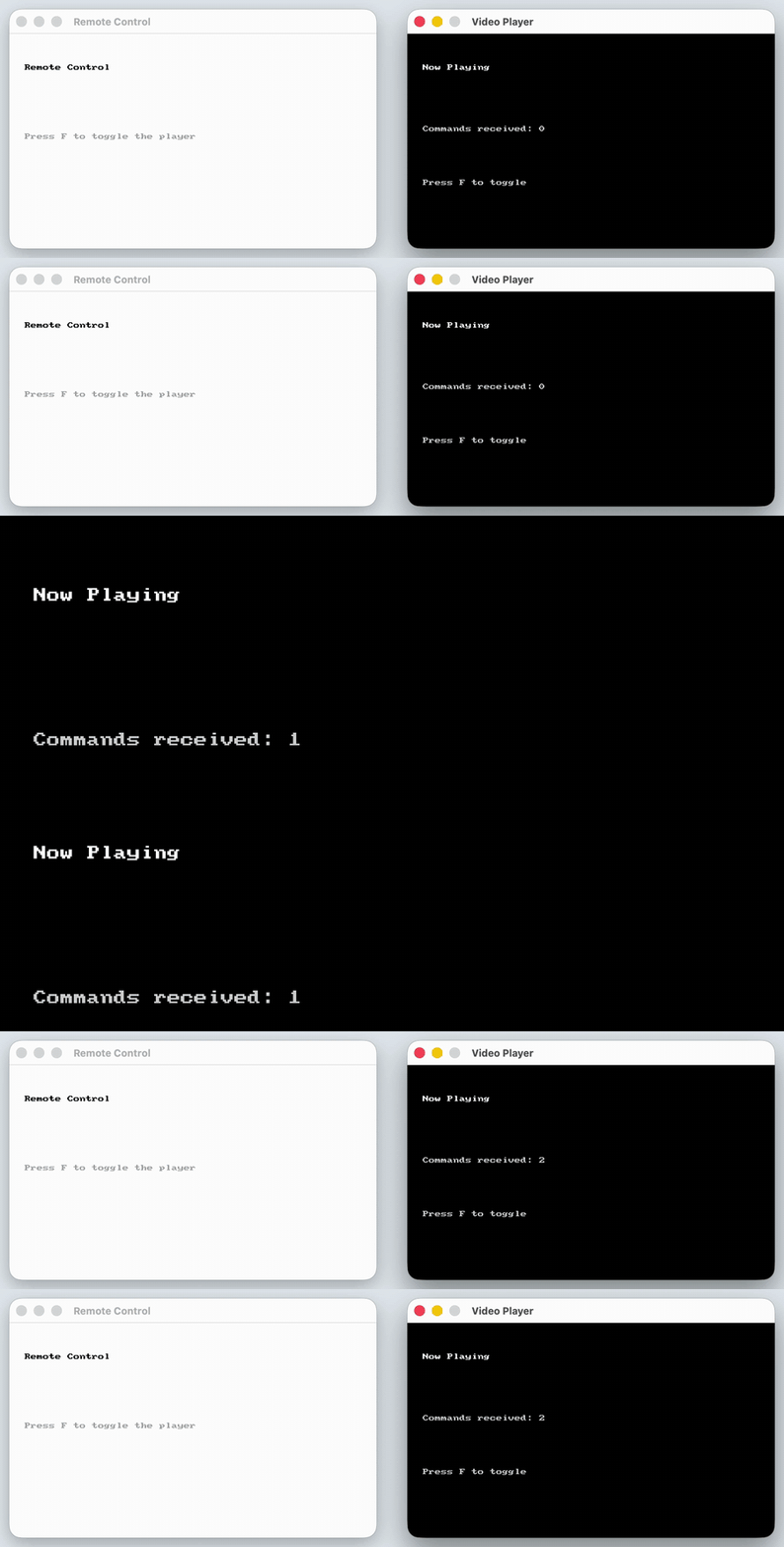
See Code Examples Example 1 : Remote Control
// The remote only needs the player's caption, so it never has to hold the player's window handle
string player_caption = " Video Player " ;
window remote_window = open_window ( " Remote Control " , 480 , 280 );
window player_window = open_window (player_caption, 480 , 280 );
// Place the windows side by side so both stay visible
move_window_to (remote_window, 60 , 100 );
move_window_to (player_window, 580 , 100 );
while ( ! quit_requested ())
// Pressing F is the remote's fullscreen button, and pressing it again undoes it
window_toggle_fullscreen (player_caption);
clear_window (remote_window, COLOR_WHITE);
draw_text_on_window (remote_window, " Remote Control " , COLOR_BLACK, " arial " , 40 , 20 , 40 );
draw_text_on_window (remote_window, " Press F to toggle the player " , COLOR_DARK_GRAY, " arial " , 20 , 20 , 130 );
refresh_window (remote_window);
// Count the commands on the player itself, because the remote is hidden while the player fills the screen
clear_window (player_window, COLOR_BLACK);
draw_text_on_window (player_window, " Now Playing " , COLOR_WHITE, " arial " , 40 , 20 , 40 );
draw_text_on_window (player_window, " Commands received: " + std:: to_string (command_count), COLOR_LIGHT_GRAY, " arial " , 30 , 20 , 120 );
draw_text_on_window (player_window, " Press F to toggle " , COLOR_LIGHT_GRAY, " arial " , 20 , 20 , 190 );
refresh_window (player_window);
using static SplashKitSDK . SplashKit;
// The remote only needs the player's caption, so it never has to hold the player's window handle
string playerCaption = " Video Player " ;
Window remoteWindow = OpenWindow ( " Remote Control " , 480 , 280 );
Window playerWindow = OpenWindow (playerCaption, 480 , 280 );
// Place the windows side by side so both stay visible
MoveWindowTo (remoteWindow, 60 , 100 );
MoveWindowTo (playerWindow, 580 , 100 );
// Pressing F is the remote's fullscreen button, and pressing it again undoes it
if ( KeyTyped ( KeyCode . FKey ))
WindowToggleFullscreen (playerCaption);
ClearWindow (remoteWindow, ColorWhite ());
DrawTextOnWindow (remoteWindow, " Remote Control " , ColorBlack (), " arial " , 40 , 20 , 40 );
DrawTextOnWindow (remoteWindow, " Press F to toggle the player " , ColorDarkGray (), " arial " , 20 , 20 , 130 );
RefreshWindow (remoteWindow);
// Count the commands on the player itself, because the remote is hidden while the player fills the screen
ClearWindow (playerWindow, ColorBlack ());
DrawTextOnWindow (playerWindow, " Now Playing " , ColorWhite (), " arial " , 40 , 20 , 40 );
DrawTextOnWindow (playerWindow, $" Commands received: { commandCount } " , ColorLightGray (), " arial " , 30 , 20 , 120 );
DrawTextOnWindow (playerWindow, " Press F to toggle " , ColorLightGray (), " arial " , 20 , 20 , 190 );
RefreshWindow (playerWindow);
namespace WindowToggleFullscreenNamedExample
public static void Main ()
// The remote only needs the player's caption, so it never has to hold the player's window handle
string playerCaption = " Video Player " ;
Window remoteWindow = SplashKit . OpenWindow ( " Remote Control " , 480 , 280 );
Window playerWindow = SplashKit . OpenWindow (playerCaption, 480 , 280 );
// Place the windows side by side so both stay visible
remoteWindow . MoveTo ( 60 , 100 );
playerWindow . MoveTo ( 580 , 100 );
while ( ! SplashKit . QuitRequested ())
SplashKit . ProcessEvents ();
// Pressing F is the remote's fullscreen button, and pressing it again undoes it
if ( SplashKit . KeyTyped ( KeyCode . FKey ))
SplashKit . WindowToggleFullscreen (playerCaption);
remoteWindow . Clear ( Color . White );
remoteWindow . DrawText ( " Remote Control " , Color . Black , " arial " , 40 , 20 , 40 );
remoteWindow . DrawText ( " Press F to toggle the player " , Color . DarkGray , " arial " , 20 , 20 , 130 );
// Count the commands on the player itself, because the remote is hidden while the player fills the screen
playerWindow . Clear ( Color . Black );
playerWindow . DrawText ( " Now Playing " , Color . White , " arial " , 40 , 20 , 40 );
playerWindow . DrawText ( $" Commands received: { commandCount } " , Color . LightGray , " arial " , 30 , 20 , 120 );
playerWindow . DrawText ( " Press F to toggle " , Color . LightGray , " arial " , 20 , 20 , 190 );
SplashKit . CloseAllWindows ();
# The remote only needs the player's caption, so it never has to hold the player's window handle
player_caption = " Video Player "
remote_window = open_window ( " Remote Control " , 480 , 280 )
player_window = open_window ( player_caption , 480 , 280 )
# Place the windows side by side so both stay visible
move_window_to ( remote_window , 60 , 100 )
move_window_to ( player_window , 580 , 100 )
while not quit_requested ():
# Pressing F is the remote's fullscreen button, and pressing it again undoes it
if key_typed ( KeyCode.f_key ):
window_toggle_fullscreen_named ( player_caption )
clear_window ( remote_window , color_white ())
draw_text_on_window_font_as_string ( remote_window , " Remote Control " , color_black () , " arial " , 40 , 20 , 40 )
draw_text_on_window_font_as_string ( remote_window , " Press F to toggle the player " , color_dark_gray () , " arial " , 20 , 20 , 130 )
refresh_window ( remote_window )
# Count the commands on the player itself, because the remote is hidden while the player fills the screen
clear_window ( player_window , color_black ())
draw_text_on_window_font_as_string ( player_window , " Now Playing " , color_white () , " arial " , 40 , 20 , 40 )
draw_text_on_window_font_as_string ( player_window , f "Commands received: {command_count} " , color_light_gray () , " arial " , 30 , 20 , 120 )
draw_text_on_window_font_as_string ( player_window , " Press F to toggle " , color_light_gray () , " arial " , 20 , 20 , 190 )
refresh_window ( player_window )
Output :
Toggle the fullscreen property of the window
Parameters:
Name Type Description wnd WindowThe window to change
Signatures:
void window_toggle_fullscreen (window wnd )
public void Window . ToggleFullscreen ();
public static void SplashKit . WindowToggleFullscreen (Window wnd);
def window_toggle_fullscreen ( wnd ) :
procedure WindowToggleFullscreen (wnd: Window)
Usage: {</>}
See Implementations API Documentation Code Examples :
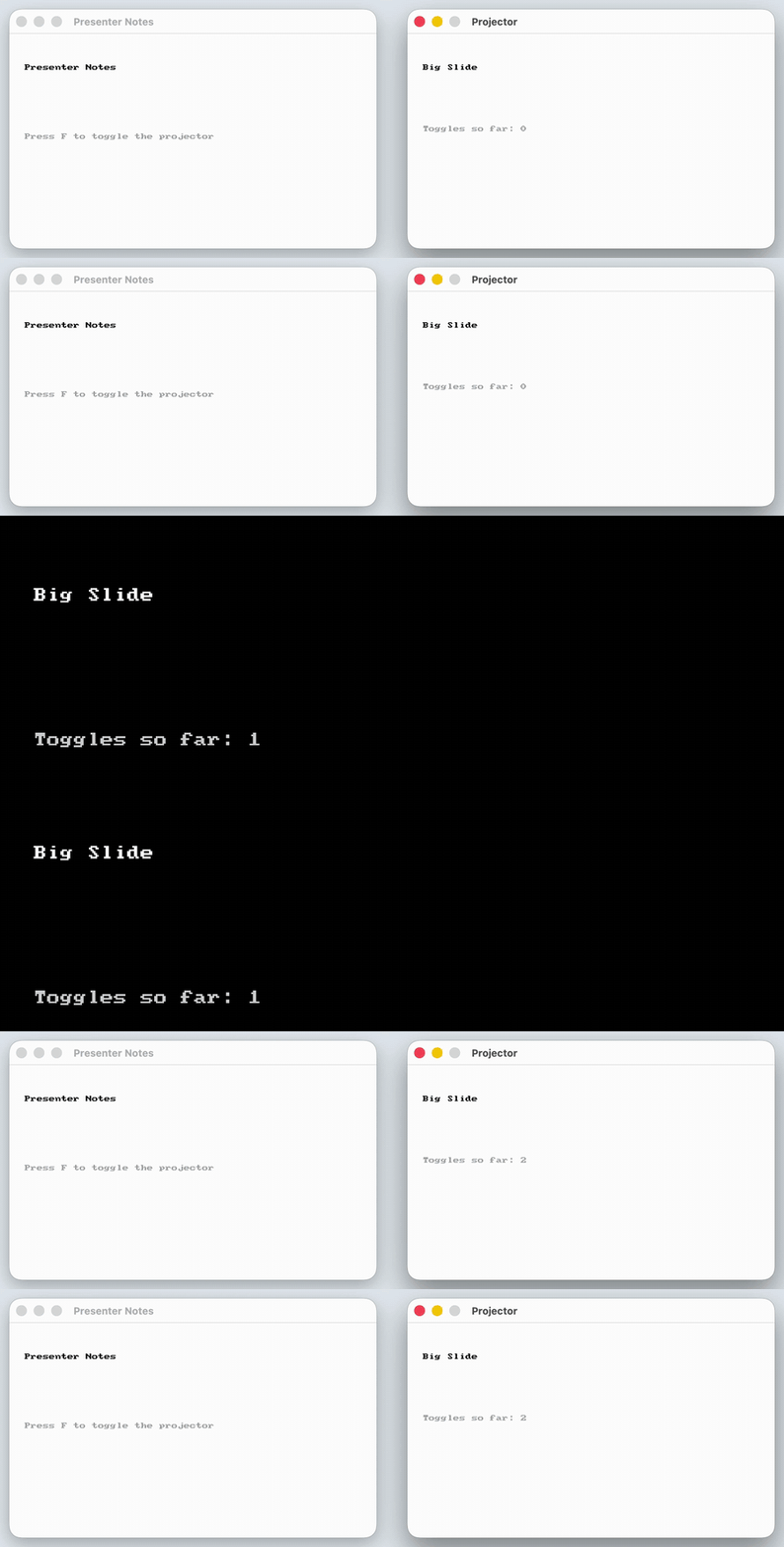
See Code Examples Example 1 : Projector Screen
window notes_window = open_window ( " Presenter Notes " , 480 , 280 );
window projector_window = open_window ( " Projector " , 480 , 280 );
// Place the windows side by side so both stay visible
move_window_to (notes_window, 60 , 100 );
move_window_to (projector_window, 580 , 100 );
while ( ! quit_requested ())
// Only the projector goes fullscreen, so the notes stay on the presenter's own screen
window_toggle_fullscreen (projector_window);
clear_window (notes_window, COLOR_WHITE);
draw_text_on_window (notes_window, " Presenter Notes " , COLOR_BLACK, " arial " , 40 , 20 , 40 );
draw_text_on_window (notes_window, " Press F to toggle the projector " , COLOR_DARK_GRAY, " arial " , 20 , 20 , 130 );
refresh_window (notes_window);
// Show the count on the projector itself, because the notes are hidden while it fills the screen
if ( window_is_fullscreen (projector_window))
clear_window (projector_window, COLOR_BLACK);
draw_text_on_window (projector_window, " Big Slide " , COLOR_WHITE, " arial " , 40 , 20 , 40 );
draw_text_on_window (projector_window, " Toggles so far: " + std:: to_string (toggle_count), COLOR_LIGHT_GRAY, " arial " , 30 , 20 , 120 );
clear_window (projector_window, COLOR_WHITE);
draw_text_on_window (projector_window, " Big Slide " , COLOR_BLACK, " arial " , 40 , 20 , 40 );
draw_text_on_window (projector_window, " Toggles so far: " + std:: to_string (toggle_count), COLOR_DARK_GRAY, " arial " , 30 , 20 , 120 );
refresh_window (projector_window);
using static SplashKitSDK . SplashKit;
Window notesWindow = OpenWindow ( " Presenter Notes " , 480 , 280 );
Window projectorWindow = OpenWindow ( " Projector " , 480 , 280 );
// Place the windows side by side so both stay visible
MoveWindowTo (notesWindow, 60 , 100 );
MoveWindowTo (projectorWindow, 580 , 100 );
// Only the projector goes fullscreen, so the notes stay on the presenter's own screen
if ( KeyTyped ( KeyCode . FKey ))
WindowToggleFullscreen (projectorWindow);
ClearWindow (notesWindow, ColorWhite ());
DrawTextOnWindow (notesWindow, " Presenter Notes " , ColorBlack (), " arial " , 40 , 20 , 40 );
DrawTextOnWindow (notesWindow, " Press F to toggle the projector " , ColorDarkGray (), " arial " , 20 , 20 , 130 );
RefreshWindow (notesWindow);
// Show the count on the projector itself, because the notes are hidden while it fills the screen
if ( WindowIsFullscreen (projectorWindow))
ClearWindow (projectorWindow, ColorBlack ());
DrawTextOnWindow (projectorWindow, " Big Slide " , ColorWhite (), " arial " , 40 , 20 , 40 );
DrawTextOnWindow (projectorWindow, $" Toggles so far: { toggleCount } " , ColorLightGray (), " arial " , 30 , 20 , 120 );
ClearWindow (projectorWindow, ColorWhite ());
DrawTextOnWindow (projectorWindow, " Big Slide " , ColorBlack (), " arial " , 40 , 20 , 40 );
DrawTextOnWindow (projectorWindow, $" Toggles so far: { toggleCount } " , ColorDarkGray (), " arial " , 30 , 20 , 120 );
RefreshWindow (projectorWindow);
namespace WindowToggleFullscreenExample
public static void Main ()
Window notesWindow = SplashKit . OpenWindow ( " Presenter Notes " , 480 , 280 );
Window projectorWindow = SplashKit . OpenWindow ( " Projector " , 480 , 280 );
// Place the windows side by side so both stay visible
notesWindow . MoveTo ( 60 , 100 );
projectorWindow . MoveTo ( 580 , 100 );
while ( ! SplashKit . QuitRequested ())
SplashKit . ProcessEvents ();
// Only the projector goes fullscreen, so the notes stay on the presenter's own screen
if ( SplashKit . KeyTyped ( KeyCode . FKey ))
SplashKit . WindowToggleFullscreen (projectorWindow);
notesWindow . Clear ( Color . White );
notesWindow . DrawText ( " Presenter Notes " , Color . Black , " arial " , 40 , 20 , 40 );
notesWindow . DrawText ( " Press F to toggle the projector " , Color . DarkGray , " arial " , 20 , 20 , 130 );
// Show the count on the projector itself, because the notes are hidden while it fills the screen
if ( projectorWindow . IsFullscreen )
projectorWindow . Clear ( Color . Black );
projectorWindow . DrawText ( " Big Slide " , Color . White , " arial " , 40 , 20 , 40 );
projectorWindow . DrawText ( $" Toggles so far: { toggleCount } " , Color . LightGray , " arial " , 30 , 20 , 120 );
projectorWindow . Clear ( Color . White );
projectorWindow . DrawText ( " Big Slide " , Color . Black , " arial " , 40 , 20 , 40 );
projectorWindow . DrawText ( $" Toggles so far: { toggleCount } " , Color . DarkGray , " arial " , 30 , 20 , 120 );
projectorWindow . Refresh ();
SplashKit . CloseAllWindows ();
notes_window = open_window ( " Presenter Notes " , 480 , 280 )
projector_window = open_window ( " Projector " , 480 , 280 )
# Place the windows side by side so both stay visible
move_window_to ( notes_window , 60 , 100 )
move_window_to ( projector_window , 580 , 100 )
while not quit_requested ():
# Only the projector goes fullscreen, so the notes stay on the presenter's own screen
if key_typed ( KeyCode.f_key ):
window_toggle_fullscreen ( projector_window )
clear_window ( notes_window , color_white ())
draw_text_on_window_font_as_string ( notes_window , " Presenter Notes " , color_black () , " arial " , 40 , 20 , 40 )
draw_text_on_window_font_as_string ( notes_window , " Press F to toggle the projector " , color_dark_gray () , " arial " , 20 , 20 , 130 )
refresh_window ( notes_window )
# Show the count on the projector itself, because the notes are hidden while it fills the screen
if window_is_fullscreen ( projector_window ):
clear_window ( projector_window , color_black ())
draw_text_on_window_font_as_string ( projector_window , " Big Slide " , color_white () , " arial " , 40 , 20 , 40 )
draw_text_on_window_font_as_string ( projector_window , f "Toggles so far: {toggle_count} " , color_light_gray () , " arial " , 30 , 20 , 120 )
clear_window ( projector_window , color_white ())
draw_text_on_window_font_as_string ( projector_window , " Big Slide " , color_black () , " arial " , 40 , 20 , 40 )
draw_text_on_window_font_as_string ( projector_window , f "Toggles so far: {toggle_count} " , color_dark_gray () , " arial " , 30 , 20 , 120 )
refresh_window ( projector_window )
Output :
Returns the width of the window with the indicated name in pixels.
Parameters:
Name Type Description name StringThe name of the window
Return Type: Integer
Returns: The width of the window
Signatures:
int window_width ( const string & name )
public static int SplashKit . WindowWidth ( string name);
def window_width_named ( name ) :
function WindowWidth ( const name : String ): Integer
Returns the width of the window in pixels.
Parameters:
Name Type Description wind WindowThe window
Return Type: Integer
Returns: The width of the window
Signatures:
int window_width (window wind )
public int Window . Width { get }
public static int SplashKit . WindowWidth (Window wind);
function WindowWidth (wind: Window): Integer
Usage: {</>}
See Implementations API Documentation Code Examples :
Returns the window that the user currently has selected. This may be different to the current window.
Return Type: Window
Returns: The window the user has selected
Signatures:
window window_with_focus ()
public static Window SplashKit . WindowWithFocus ();
function WindowWithFocus (): Window
The x location of the window on the displays.
Parameters:
Name Type Description name StringThe name of the window
Return Type: Integer
Returns: Its location on the displays
Signatures:
int window_x ( const string & name )
public static int SplashKit . WindowX ( string name);
def window_x_named ( name ) :
function WindowX ( const name : String ): Integer
The x location of the window on the displays.
Parameters:
Name Type Description wnd WindowThe window
Return Type: Integer
Returns: Its location on the displays
Signatures:
public int Window . X { get }
public static int SplashKit . WindowX (Window wnd);
function WindowX (wnd: Window): Integer
Usage: {</>}
See Implementations API Documentation Code Examples :
The y location of the window on the displays.
Parameters:
Name Type Description name StringThe name of the window
Return Type: Integer
Returns: Its location on the displays
Signatures:
int window_y ( const string & name )
public static int SplashKit . WindowY ( string name);
def window_y_named ( name ) :
function WindowY ( const name : String ): Integer
The y location of the window on the displays.
Parameters:
Name Type Description wnd WindowThe window
Return Type: Integer
Returns: Its location on the displays
Signatures:
public int Window . Y { get }
public static int SplashKit . WindowY (Window wnd);
function WindowY (wnd: Window): Integer
Usage: {</>}
See Implementations API Documentation Code Examples :
The Window type is used to refer to a window that you have opened
in SplashKit. You create new Windows using Open WindowClose Window