Create and return a new Timer. The timer will not be started, and will have an initial ‘ticks’ of 0.
Parameters:
Name Type Description name StringThe name of the timer for resource tracking
Return Type: Timer
Returns: A new timer.
Signatures:
timer create_timer (string name )
public static Timer SplashKit . CreateTimer ( string name);
public Timer ( string name);
function CreateTimer ( name : String ): Timer
Usage: {</>}
See Implementations Tutorials and Guides :
API Documentation Code Examples :
See Code Examples Example 1 : Creating and Running a Simple Timer
open_window ( " Simple Timer Display " , 800 , 600 );
timer example_timer = create_timer ( " Example Timer " );
start_timer (example_timer);
while ( ! quit_requested ())
double elapsed_seconds = timer_ticks (example_timer) / 1000.0 ;
clear_screen (COLOR_WHITE);
draw_text ( " Timer created and running " , COLOR_BLACK, 20 , 20 );
" Elapsed time: " + std:: to_string (elapsed_seconds) + " seconds " ,
draw_text ( " Close the window to finish. " , COLOR_BLACK, 20 , 100 );
free_timer (example_timer);
using static SplashKitSDK . SplashKit;
OpenWindow ( " Simple Timer Display " , 800 , 600 );
Timer timer = CreateTimer ( " Example Timer " );
double elapsedSeconds = TimerTicks (timer) / 1000.0 ;
ClearScreen ( ColorWhite ());
DrawText ( " Timer created and running " , ColorBlack (), 20 , 20 );
DrawText ( " Elapsed time: " + elapsedSeconds . ToString ( " 0.0 " ) + " seconds " , ColorBlack (), 20 , 60 );
DrawText ( " Close the window to finish. " , ColorBlack (), 20 , 100 );
namespace CreateTimerExample
public static void Main ()
SplashKit . OpenWindow ( " Simple Timer Display " , 800 , 600 );
SplashKitSDK . Timer timer = SplashKit . CreateTimer ( " Example Timer " );
SplashKit . StartTimer (timer);
while ( ! SplashKit . QuitRequested ())
SplashKit . ProcessEvents ();
double elapsedSeconds = SplashKit . TimerTicks (timer) / 1000.0 ;
SplashKit . ClearScreen ( Color . White );
SplashKit . DrawText ( " Timer created and running " , Color . Black , 20 , 20 );
SplashKit . DrawText ( " Elapsed time: " + elapsedSeconds . ToString ( " 0.0 " ) + " seconds " , Color . Black , 20 , 60 );
SplashKit . DrawText ( " Close the window to finish. " , Color . Black , 20 , 100 );
SplashKit . RefreshScreen ( 60 );
SplashKit . FreeTimer (timer);
open_window ( " Simple Timer Display " , 800 , 600 )
timer = create_timer ( " Example Timer " )
while not quit_requested ():
elapsed_seconds = timer_ticks ( timer ) / 1000.0
clear_screen ( color_white ())
draw_text_no_font_no_size ( " Timer created and running " , color_black () , 20 , 20 )
draw_text_no_font_no_size (
" Elapsed time: " + format ( elapsed_seconds , " .1f " ) + " seconds " ,
draw_text_no_font_no_size (
" Close the window to finish. " ,
refresh_screen_with_target_fps ( 60 )
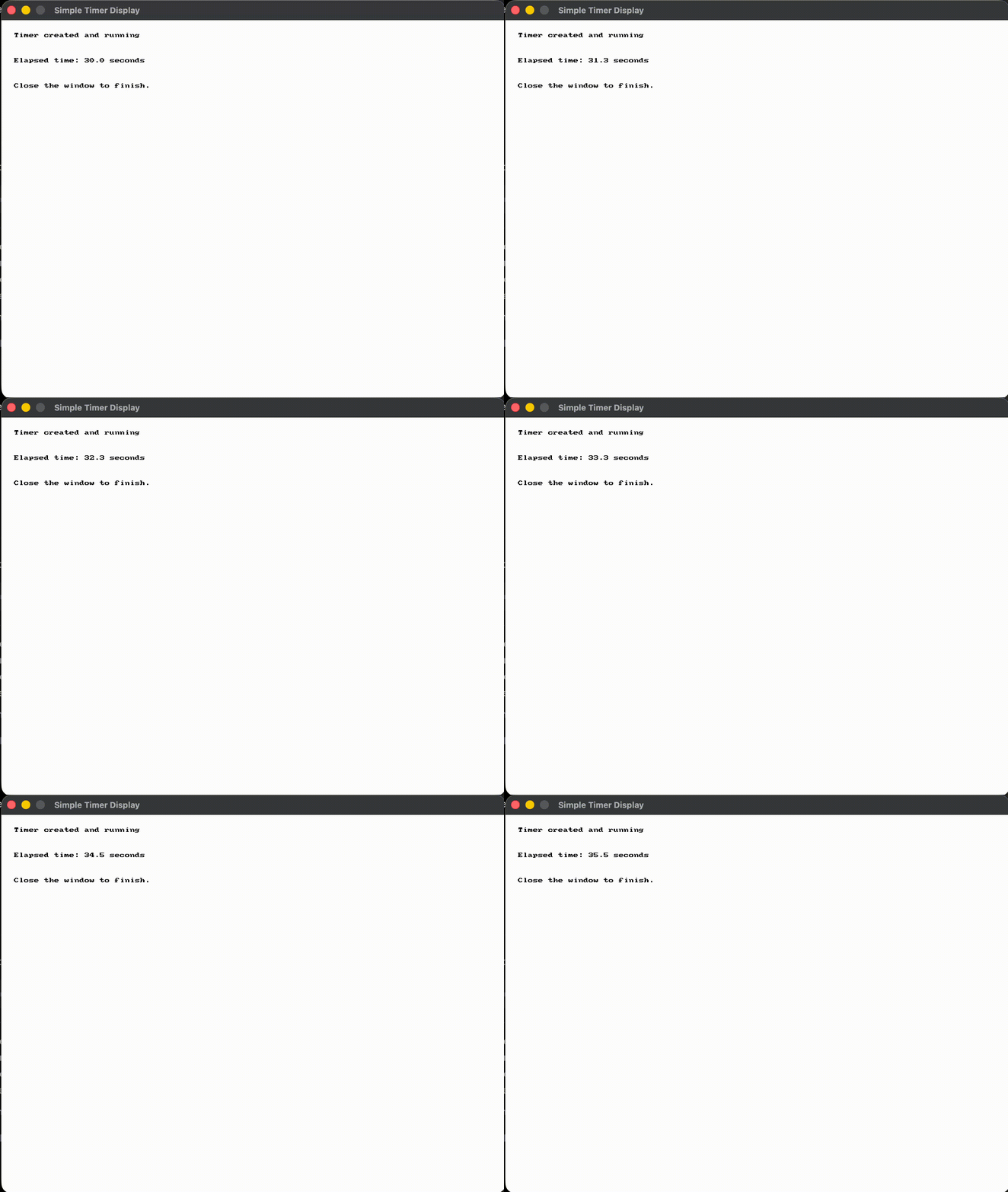
Output :
Free all of timers that have been created.
Signatures:
public static void SplashKit . FreeAllTimers ();
procedure FreeAllTimers ()
Usage: {</>}
See Implementations
Free the memory used to store this timer.
Parameters:
Name Type Description to_free TimerThe time to be released.
Signatures:
void free_timer (timer to_free )
public void Timer . Free ();
public static void SplashKit . FreeTimer (Timer toFree);
procedure FreeTimer (toFree: Timer)
Usage: {</>}
See Implementations API Documentation Code Examples :
Checks if SplashKit has a timer with the indicated name.
Parameters:
Name Type Description name StringThe name of the timer
Return Type: Boolean
Returns: True if SplashKit has created a timer with that name.
Signatures:
bool has_timer (string name )
public static bool SplashKit . HasTimer ( string name);
def has_timer_named ( name ) :
function HasTimer ( name : String ): Boolean
Pause the timer, getting ticks from a paused timer will continue to return the same time.
Parameters:
Name Type Description name StringThe name of the timer
Signatures:
void pause_timer (string name )
public static void SplashKit . PauseTimer ( string name);
def pause_timer_named ( name ) :
procedure PauseTimer ( name : String )
Pause the timer, getting ticks from a paused timer will continue to return the same time.
Parameters:
Name Type Description to_pause TimerThe timer
Signatures:
void pause_timer (timer to_pause )
public void Timer . Pause ();
public static void SplashKit . PauseTimer (Timer toPause);
def pause_timer ( to_pause ) :
procedure PauseTimer (toPause: Timer)
Usage: {</>}
See Implementations API Documentation Code Examples :
Resets the named timer
Parameters:
Name Type Description name StringThe name of the timer
Signatures:
void reset_timer (string name )
public static void SplashKit . ResetTimer ( string name);
def reset_timer_named ( name ) :
procedure ResetTimer ( name : String )
Resets the time of a given timer
Parameters:
Name Type Description tmr TimerThe timer
Signatures:
void reset_timer (timer tmr )
public void Timer . Reset ();
public static void SplashKit . ResetTimer (Timer tmr);
procedure ResetTimer (tmr: Timer)
Usage: {</>}
See Implementations API Documentation Code Examples :
Resumes the named timer.
Parameters:
Name Type Description name StringThe name of the timer
Signatures:
void resume_timer (string name )
public static void SplashKit . ResumeTimer ( string name);
def resume_timer_named ( name ) :
procedure ResumeTimer ( name : String )
Resumes a paused timer.
Parameters:
Name Type Description to_resume TimerThe timer
Signatures:
void resume_timer (timer to_resume )
public void Timer . Resume ();
public static void SplashKit . ResumeTimer (Timer toResume);
def resume_timer ( to_resume ) :
procedure ResumeTimer (toResume: Timer)
Usage: {</>}
See Code Examples Example 1 : Resuming a Paused Timer
// Create and start a timer
timer my_timer = create_timer ( " my_timer " );
write_line ( " Timer started! " );
write_line ( " After 1 second: " + to_string (( int ) timer_ticks (my_timer)) + " ms " );
write_line ( " Timer paused! " );
// Wait 1 second while paused - timer should NOT increase
write_line ( " After pause delay, still at: " + to_string (( int ) timer_ticks (my_timer)) + " ms " );
write_line ( " Timer resumed! " );
// Wait 1 more second - timer continues from where it left off
write_line ( " After resume: " + to_string (( int ) timer_ticks (my_timer)) + " ms " );
using static SplashKitSDK . SplashKit;
// Create and start a timer
SplashKitSDK . Timer myTimer = CreateTimer ( " my_timer " );
WriteLine ( " Timer started! " );
WriteLine ( " After 1 second: " + TimerTicks (myTimer) + " ms " );
WriteLine ( " Timer paused! " );
// Wait 1 second while paused - timer should NOT increase
WriteLine ( " After pause delay, still at: " + TimerTicks (myTimer) + " ms " );
WriteLine ( " Timer resumed! " );
// Wait 1 more second - timer continues from where it left off
WriteLine ( " After resume: " + TimerTicks (myTimer) + " ms " );
static void Main ( string [] args)
// Create and start a timer
SplashKitSDK . Timer myTimer = SplashKit . CreateTimer ( " my_timer " );
SplashKit . StartTimer (myTimer);
SplashKit . WriteLine ( " Timer started! " );
SplashKit . WriteLine ( " After 1 second: " + SplashKit . TimerTicks (myTimer) + " ms " );
SplashKit . PauseTimer (myTimer);
SplashKit . WriteLine ( " Timer paused! " );
// Wait 1 second while paused - timer should NOT increase
SplashKit . WriteLine ( " After pause delay, still at: " + SplashKit . TimerTicks (myTimer) + " ms " );
SplashKit . ResumeTimer (myTimer);
SplashKit . WriteLine ( " Timer resumed! " );
// Wait 1 more second - timer continues from where it left off
SplashKit . WriteLine ( " After resume: " + SplashKit . TimerTicks (myTimer) + " ms " );
SplashKit . FreeTimer (myTimer);
# Create and start a timer
my_timer = create_timer ( " my_timer " )
write_line ( " Timer started! " )
write_line ( " After 1 second: " + str ( timer_ticks ( my_timer )) + " ms " )
write_line ( " Timer paused! " )
# Wait 1 second while paused - timer should NOT increase
write_line ( " After pause delay, still at: " + str ( timer_ticks ( my_timer )) + " ms " )
write_line ( " Timer resumed! " )
# Wait 1 more second - timer continues from where it left off
write_line ( " After resume: " + str ( timer_ticks ( my_timer )) + " ms " )
Output :
Start a timer. The timer will then start recording the time that has passed. You can check how long has past since the timer was started using the Timer Ticks
Parameters:
Name Type Description name StringThe name of the timer
Signatures:
void start_timer (string name )
public static void SplashKit . StartTimer ( string name);
def start_timer_named ( name ) :
procedure StartTimer ( name : String )
Start a timer. The timer will then start recording the time that has passed. You can check how long has past since the timer was started using the Timer Ticks
Parameters:
Name Type Description to_start TimerThe timer
Signatures:
void start_timer (timer to_start )
public void Timer . Start ();
public static void SplashKit . StartTimer (Timer toStart);
def start_timer ( to_start ) :
procedure StartTimer (toStart: Timer)
Usage: {</>}
See Implementations Tutorials and Guides :
API Documentation Code Examples :
Stop the timer. The time is reset to 0 and you must recall start to begin the timer ticking again.
Parameters:
Name Type Description name StringThe name of the timer
Signatures:
void stop_timer (string name )
public static void SplashKit . StopTimer ( string name);
def stop_timer_named ( name ) :
procedure StopTimer ( name : String )
Stop the timer. The time is reset to 0 and you must recall start to begin the timer ticking again.
Parameters:
Name Type Description to_stop TimerThe timer
Signatures:
void stop_timer (timer to_stop )
public void Timer . Stop ();
public static void SplashKit . StopTimer (Timer toStop);
procedure StopTimer (toStop: Timer)
Usage: {</>}
See Implementations Tutorials and Guides :
API Documentation Code Examples :
Get the timer created with the indicated name.
Parameters:
Name Type Description name StringThe name of the timer to fetch
Return Type: Timer
Returns: Returns the timer fetched from SplashKit
Signatures:
timer timer_named (string name )
public static Timer SplashKit . TimerNamed ( string name);
function TimerNamed ( name : String ): Timer
Indicates if the timer is paused.
Parameters:
Name Type Description name StringThe name of the timer
Return Type: Boolean
Returns: True if the timer is paused
Signatures:
bool timer_paused (string name )
public static bool SplashKit . TimerPaused ( string name);
def timer_paused_named ( name ) :
function TimerPaused ( name : String ): Boolean
Indicates if the timer is paused.
Parameters:
Name Type Description to_get TimerThe timer
Return Type: Boolean
Returns: True if the timer is paused
Signatures:
bool timer_paused (timer to_get )
public bool Timer . IsPaused { get }
public static bool SplashKit . TimerPaused (Timer toGet);
def timer_paused ( to_get ) :
function TimerPaused (toGet: Timer): Boolean
Indicates if the timer is started.
Parameters:
Name Type Description name StringThe name of the timer
Return Type: Boolean
Returns: True if the timer has been started
Signatures:
bool timer_started (string name )
public static bool SplashKit . TimerStarted ( string name);
def timer_started_named ( name ) :
function TimerStarted ( name : String ): Boolean
Indicates if the timer is started.
Parameters:
Name Type Description to_get TimerThe timer
Return Type: Boolean
Returns: True if the timer has been started
Signatures:
bool timer_started (timer to_get )
public bool Timer . IsStarted { get }
public static bool SplashKit . TimerStarted (Timer toGet);
def timer_started ( to_get ) :
function TimerStarted (toGet: Timer): Boolean
Usage: {</>}
See Code Examples Example 1 : Start-Stop Stopwatch
open_window ( " Start-Stop Stopwatch " , 600 , 300 );
// Create a named timer - it is not started until start_timer is called
timer game_timer = create_timer ( " game_timer " );
while ( ! quit_requested ())
// Start the timer when SPACE is pressed
if ( key_typed (SPACE_KEY))
// Stop the timer when S is pressed
clear_screen (COLOR_WHITE);
// Use timer_started to check whether the timer is currently running
bool is_running = timer_started (game_timer);
// Display the timer status
draw_text ( " Status: Running " , COLOR_GREEN, " Arial " , 28 , 170 , 80 );
draw_text ( " Status: Stopped " , COLOR_RED, " Arial " , 28 , 170 , 80 );
// Display elapsed milliseconds - std::to_string converts a number to a string
draw_text ( " Elapsed: " + std:: to_string ( timer_ticks (game_timer)) + " ms " ,
COLOR_BLACK, " Arial " , 20 , 185 , 140 );
draw_text ( " [SPACE] Start [S] Stop " , COLOR_GRAY, " Arial " , 16 , 165 , 220 );
// using static allows calling SplashKit methods directly (e.g. TimerStarted , StartTimer)
// using SplashKitSDK is required for Timer and KeyCode types
using static SplashKitSDK . SplashKit;
OpenWindow ( " Start-Stop Stopwatch " , 600 , 300 );
// SplashKitSDK.Timer needed to distinguish from System.Threading.Timer
// Create a named timer - it is not started until StartTimer is called
SplashKitSDK . Timer gameTimer = new SplashKitSDK . Timer( " game_timer " );
// Start the timer when SPACE is pressed
if ( KeyTyped ( KeyCode . SpaceKey ))
// Stop the timer when S is pressed
if ( KeyTyped ( KeyCode . SKey ))
ClearScreen ( ColorWhite ());
// Use TimerStarted to check whether the timer is currently running
bool isRunning = TimerStarted (gameTimer);
// Display the timer status
DrawText ( " Status: Running " , ColorGreen (), " Arial " , 28 , 170 , 80 );
DrawText ( " Status: Stopped " , ColorRed (), " Arial " , 28 , 170 , 80 );
// Display elapsed milliseconds
DrawText ( " Elapsed: " + TimerTicks (gameTimer) + " ms " ,
ColorBlack (), " Arial " , 20 , 185 , 140 );
DrawText ( " [SPACE] Start [S] Stop " , ColorGray (), " Arial " , 16 , 165 , 220 );
public static void Main ()
SplashKit . OpenWindow ( " Start-Stop Stopwatch " , 600 , 300 );
// SplashKitSDK.Timer needed to distinguish from System.Threading.Timer
// Create a named timer - it is not started until StartTimer is called
SplashKitSDK . Timer gameTimer = new SplashKitSDK . Timer( " game_timer " );
while ( ! SplashKit . QuitRequested ())
SplashKit . ProcessEvents ();
// Start the timer when SPACE is pressed
if ( SplashKit . KeyTyped ( KeyCode . SpaceKey ))
SplashKit . StartTimer (gameTimer);
// Stop the timer when S is pressed
if ( SplashKit . KeyTyped ( KeyCode . SKey ))
SplashKit . StopTimer (gameTimer);
SplashKit . ClearScreen ( Color . White );
// Use TimerStarted to check whether the timer is currently running
bool isRunning = SplashKit . TimerStarted (gameTimer);
// Display the timer status
SplashKit . DrawText ( " Status: Running " , Color . Green , " Arial " , 28 , 170 , 80 );
SplashKit . DrawText ( " Status: Stopped " , Color . Red , " Arial " , 28 , 170 , 80 );
// Display elapsed milliseconds
SplashKit . DrawText ( " Elapsed: " + SplashKit . TimerTicks (gameTimer) + " ms " ,
Color . Black , " Arial " , 20 , 185 , 140 );
SplashKit . DrawText ( " [SPACE] Start [S] Stop " , Color . Gray , " Arial " , 16 , 165 , 220 );
SplashKit . RefreshScreen ( 60 );
SplashKit . CloseAllWindows ();
open_window ( " Start-Stop Stopwatch " , 600 , 300 )
# Create a named timer - it is not started until start_timer is called
game_timer = create_timer ( " game_timer " )
while not quit_requested ():
# Start the timer when SPACE is pressed
if key_typed ( KeyCode.space_key ):
# Stop the timer when S is pressed
if key_typed ( KeyCode.s_key ):
clear_screen ( color_white ())
# Use timer_started to check whether the timer is currently running
is_running = timer_started ( game_timer )
# Display the timer status
draw_text_font_as_string ( " Status: Running " , color_green () , " Arial " , 28 , 170 , 80 )
draw_text_font_as_string ( " Status: Stopped " , color_red () , " Arial " , 28 , 170 , 80 )
# Display elapsed milliseconds
draw_text_font_as_string ( " Elapsed: " + str ( timer_ticks ( game_timer )) + " ms " ,
color_black () , " Arial " , 20 , 185 , 140 )
draw_text_font_as_string ( " [SPACE] Start [S] Stop " , color_gray () , " Arial " , 16 , 165 , 220 )
refresh_screen_with_target_fps ( 60 )
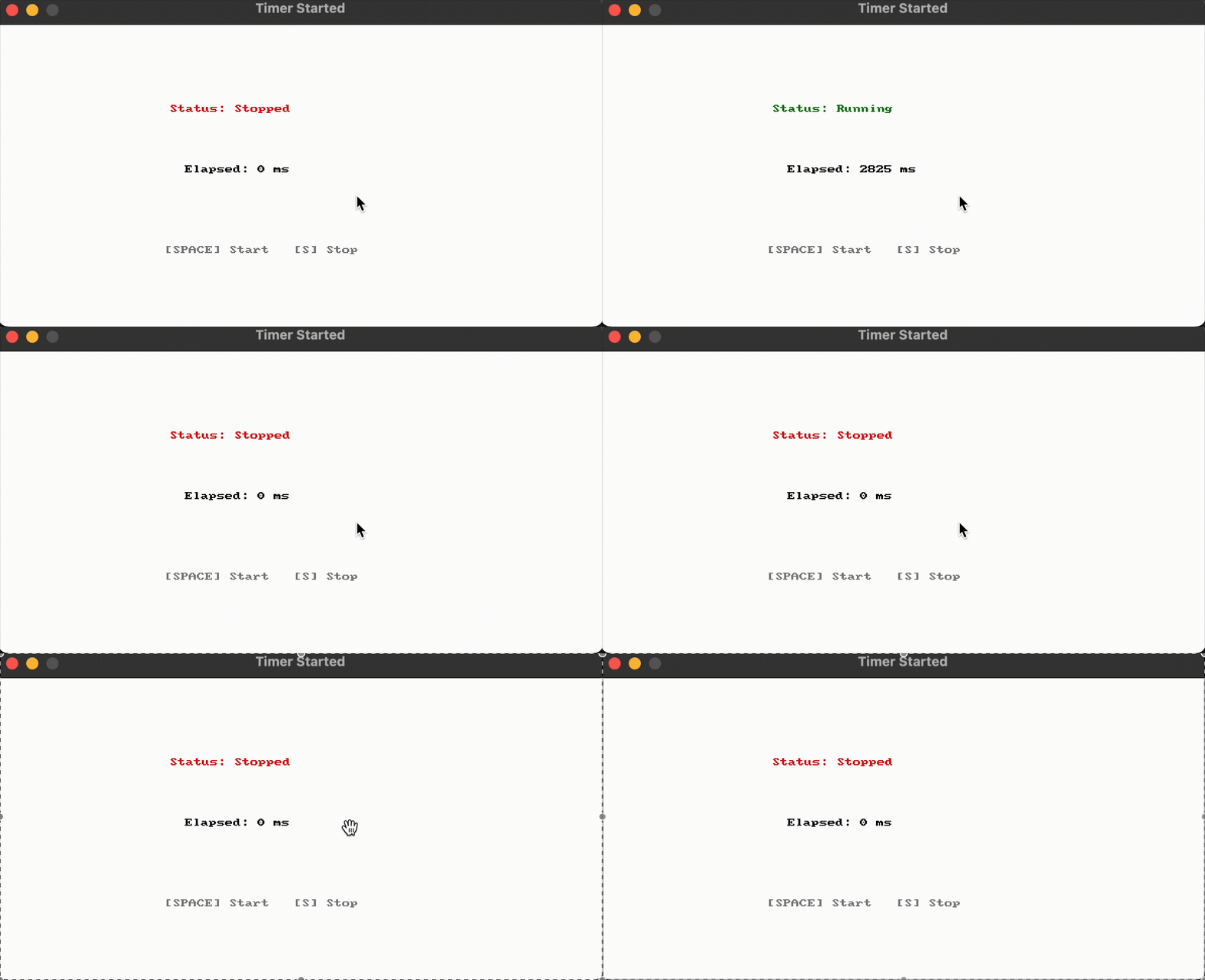
Output :
Gets the number of ticks (milliseconds) that have passed since the timer was started/reset. When paused the timer’s ticks will not advance until the timer is once again resumed.
Parameters:
Name Type Description name StringThe name of the Timer
Return Type: Unsigned Integer
Signatures:
unsigned int timer_ticks (string name )
public static uint SplashKit . TimerTicks ( string name);
def timer_ticks_named ( name ) :
function TimerTicks ( name : String ): Cardinal
Gets the number of ticks (milliseconds) that have passed since the timer was started/reset. When paused the timer’s ticks will not advance until the timer is once again resumed.
Parameters:
Name Type Description to_get TimerThe timer
Return Type: Unsigned Integer
Signatures:
unsigned int timer_ticks (timer to_get )
public uint Timer . Ticks { get }
public static uint SplashKit . TimerTicks (Timer toGet);
function TimerTicks (toGet: Timer): Cardinal
Usage: {</>}
See Implementations Tutorials and Guides :
API Documentation Code Examples :
Timers in SplashKit can be used to track the passing of time. In general
you will create a timer, start it, then use it to track time by asking
for the timer’s ticks (milliseconds).